Google Ads vs. Meta Ads: The definitive guide for nonprofits
Last Updated on October 26, 2026
Google Ads and Meta Ads (Facebook and Instagram) are two of the most effective channels you can add to your nonprofit’s marketing mix. They reach people at different moments, so the decision to prioritize Google Ads vs. Meta Ads depends on who you want to reach and what you want them to do.
The core difference is discovery vs. intent. Meta Ads introduces your mission to people who aren’t searching yet, using photos and short videos to spark interest. Google Ads puts your nonprofit in front of people already searching for help, a program, or a cause to support.
In this guide, we’ll cover how each platform works, where it fits, and how to run them together. Specifically, we’ll talk about:
- What are Google Ads? FAQs
- What are Meta Ads? FAQs
- Google Ads vs. Meta Ads: A side-by-side comparison
- How do Google Ads and Meta Ads work together?
- How Getting Attention maximizes the impact of Google Ads & Meta Ads
- Frequently asked questions
What are Google Ads? FAQs
Google Ads is an online advertising platform that lets you place paid search ads on Google’s search engine results pages (SERPs). When someone searches a keyword tied to your cause, your text ad appears at the top of the results. That puts your nonprofit in front of people who are already looking for information, services, or a way to support a mission similar to yours.
How does Google Ads work?
Google Ads connects your organization with people at the exact moment they express active interest on Google. Here is how the search mechanism works:
- Target relevant search keywords: You select specific terms and phrases that match your organization’s mission, community services, and programs.
- Match active user queries: When a user searches for a matching phrase, Google runs an instant automated auction to evaluate which ads align with that searcher’s intent (or what they were most likely looking for when they searched the keyword).
- Display prominent text ads: High-relevance text or image ads appear at the top of Google search results, giving your cause immediate, top-of-page visibility over organic listings.
- Direct motivated searchers to your site: Searchers click your ad because it directly answers what they were searching for, sending high-intent visitors straight to your landing page.
What is the Google Ad Grant?
Google awards eligible 501(c)(3) nonprofits up to $10,000/month ($120,000 a year) infree ad credits for Google Search. The credits only apply to keyword-targeted text ads and Performance Max ads on Google Search results pages.
As long as your account remains compliant with Google’s policies, the $10,000 allocation renews every month.
What can nonprofits use Google Ads to achieve?
Google Ads translates online search intent into operational results by placing targeted text ads at the top of Google search results when people enter specific search terms. Nonprofits leverage this search mechanism across several key areas:
- Recruit volunteers: Bidding on localized, high-intent keywords (such as “volunteer cleanups near me” or “become a volunteer tutor”) displays top-of-page text ads that direct motivated searchers straight to your website’s volunteer registration forms.
- Share educational resources: Promoting specific content pages, e-books, research guides, and toolkits via keyword-targeted campaigns captures users actively seeking information and leads them directly to downloadable assets on your site.
- Acquire new donors: Bidding on cause-specific and giving-intent keywords (such as “donate to animal shelters” or “support climate nonprofits”) places sponsored text ads above organic search listings, sending givers directly to conversion-optimized donation pages.
- Fill event registrations: Setting up location-targeted campaigns around search queries for upcoming galas, fundraising walks, workshops, or webinars displays time-sensitive ads to local searchers, driving ticket purchases and online RSVPs.
- Connect beneficiaries with services: Targeting searches for direct community assistance (such as “ESL classes near me”, “crisis hotline”, or “food pantry”) directs individuals in need straight to program intake pages, support portals, or service schedules.
Who is eligible for the Google Ad Grant?
Eligibility for Google Ads starts with an active 501(c)(3) status in the United States or the equivalent nonprofit status in eligible countries.
Your site matters just as much. You’ll need a well-built website that uses HTTPS, states your mission clearly, loads quickly, carries no commercial ads, and offers substantial (mission-relevant, unique) content. Running a few technical site checks before you apply helps you catch speed or security issues early. Google also asks you to agree to its non-discrimination policy and donation receipt certifications.
A few organization types are ineligible for the program: K-12 schools, universities, healthcare or hospital systems, and government or public entities.
What are the main benefits of Google Ads for nonprofits?
Google Ads puts your nonprofit in front of people who are searching for a way to get involved right now, and the Google Ad Grants program covers up to $120,000 per year in free advertising credits to help you do it.
Here’s what that means for your nonprofit:
- Reach people who are ready to act: Someone searching “volunteer near me” or “donate to a food bank” already wants to help, and your ad appears in that moment.
- Get top-of-page visibility fast: Organic rankings take months to build, but ads put you at the top of search results right away.
- Support your organic and AI search work: Clear, direct content improves your ad quality scores and makes your site easier for AI engines to crawl, boosting your appearances in AI overviews.
- Scale with grant credits: With up to $120,000 per year in free in-kind search ads, you can expand community awareness without touching your operational budget.
- Track real outcomes: Every click ties back to something you can measure, such as online donations, newsletter sign-ups, and volunteer applications.
Google Ads lets you reach people who are already looking for a cause like yours, and the free grant credits mean you can grow that traffic without risking your budget.
What are Meta Ads? FAQs
Meta Ads is a social media advertising platform that lets you run visual campaigns across Facebook, Instagram, Messenger, and the Meta Audience Network. Search ads wait for someone to type a keyword. Meta Ads goes the other way: it introduces your nonprofit’s mission, programs, and urgent appeals to algorithmically selected audiences while they scroll their daily feeds.
How does Meta Ads work for discovery?
Meta Ads reaches users and drives awareness through the following processes:
- Build an audience profile based on location, age, gender, interests, and online behaviors.
- Ads appear naturally in Facebook and Instagram feeds, Stories, and Reels, right where people are already scrolling.
- Photos, short testimonial videos, and multi-card posts show the real human impact of your work and build affinity for your brand.
- Call-to-action buttons send people to a landing page or open an instant sign-up form without leaving the app.
What ad formats are available on Meta Ads?
Nonprofits can leverage a variety of visual ad formats on Meta Ads to engage supporters, such as:
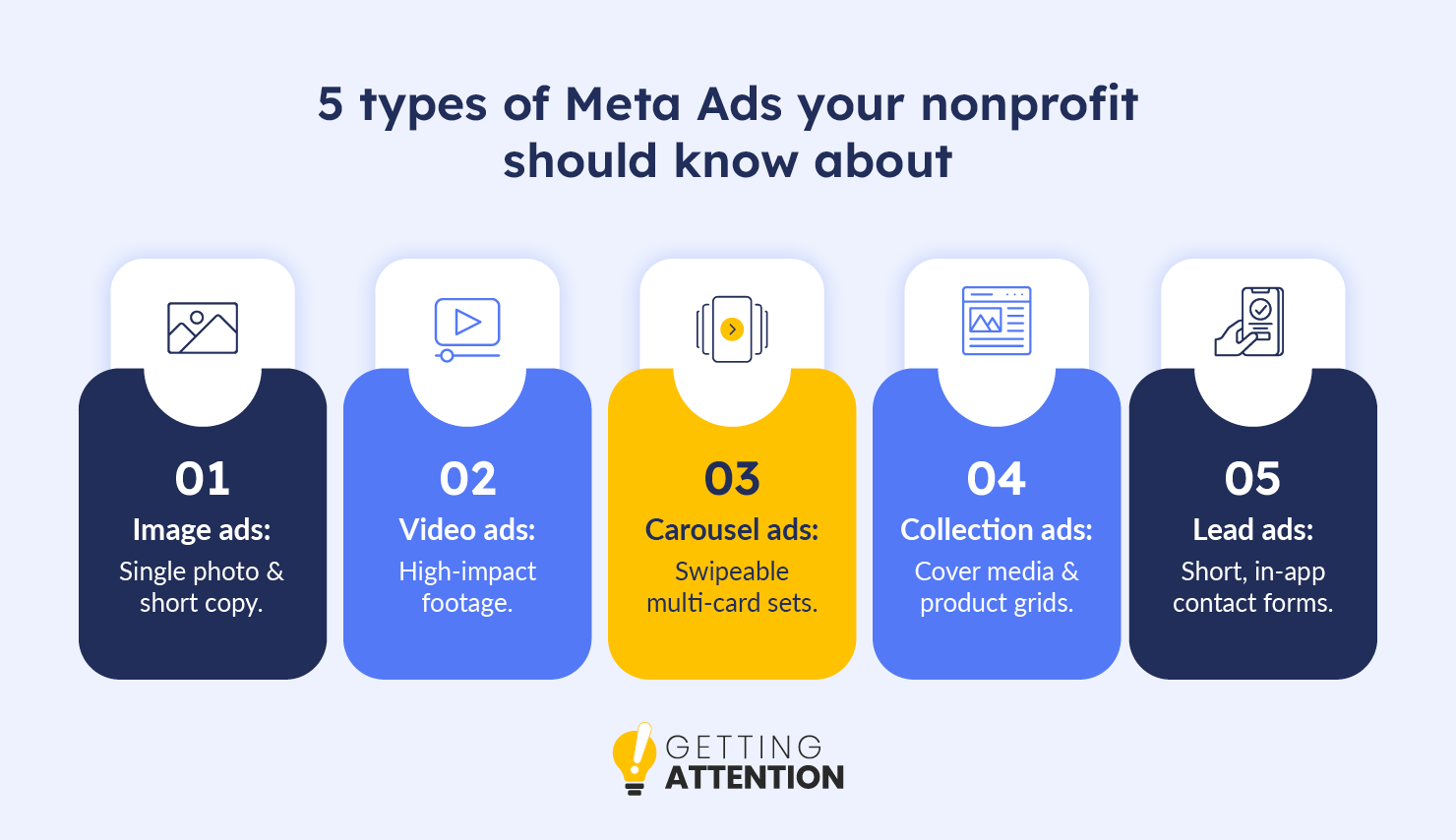
- Image ads: A single photo paired with a few concise words works especially well for urgent appeals, simple announcements, or event registrations when you want to make things clear at a glance.
- Video ads: A single video shared in the Feed, Stories, or Reels—perfect for explaining your mission, interviewing the people you serve, or demonstrating donor impact.
- Carousel ads: A swipeable ad featuring up to 10 images or videos, ideal for highlighting multiple programs, volunteer opportunities, or a story told in sequence.
- Collection ads: A cover image or video paired with a product grid is ideal for organizations offering merchandise, gala tickets, or auction items.
- Lead ads: In-app forms that collect contact information without sending users to an external page. They’re ideal for newsletter signups, petitions, or volunteer interest.
Who can nonprofits reach with Meta Ads?
Meta gives you four main ways to find supporters:
- Interest-based targeting: Reach local community members who care about causes like animal welfare, environmental conservation, or youth tutoring.
- Custom audiences: Upload email subscriber lists or donor records so you can message existing supporters directly.
- Lookalike audiences: Use Meta’s algorithm to find new people who closely resemble your top donors or volunteers.
- Retargeting: Bring back people who visited your website or clicked a search ad but didn’t finish a donation or form.
What can nonprofits use Meta Ads to achieve?
Meta Ads translates social discovery into support by proactively placing visual campaigns across Facebook and Instagram feeds, Stories, and Reels. Nonprofits leverage Meta’s demographic targeting, lookalike modeling, and native app features across several key areas:
- Build broad brand awareness: Serving photo carousels and short-form video reels across Facebook and Instagram introduces your mission to thousands of local community members long before they ever think to enter a search query on Google.
- Acquire new financial donors: Uploading custom supporter lists allows Meta’s algorithm to build lookalike audiences—delivering visual impact stories and video testimonials to new social media users who closely mirror the demographics and giving habits of your current top donors.
- Recruit volunteers and advocates: Deploying native Instant Lead Forms directly within social feeds allows prospective volunteers to submit contact details and applications in a few taps without ever leaving Facebook or Instagram.
- Re-engage warm prospects (Retargeting): Installing the Meta Pixel and Conversions API (CAPI) tracks website visitors who left your site without completing a form, enabling you to serve follow-up visual ads that remind them to finish their donation or volunteer application.
- Drive event RSVPs and ticket sales: Running location-targeted vertical video ads on Instagram Stories and Reels engages local mobile users interested in your cause, directing them straight to event landing pages to buy tickets or register.
What technical setup is required for Meta Ads?
Setting up Meta Ads correctly requires a few key technical configurations on your website and Business Manager:
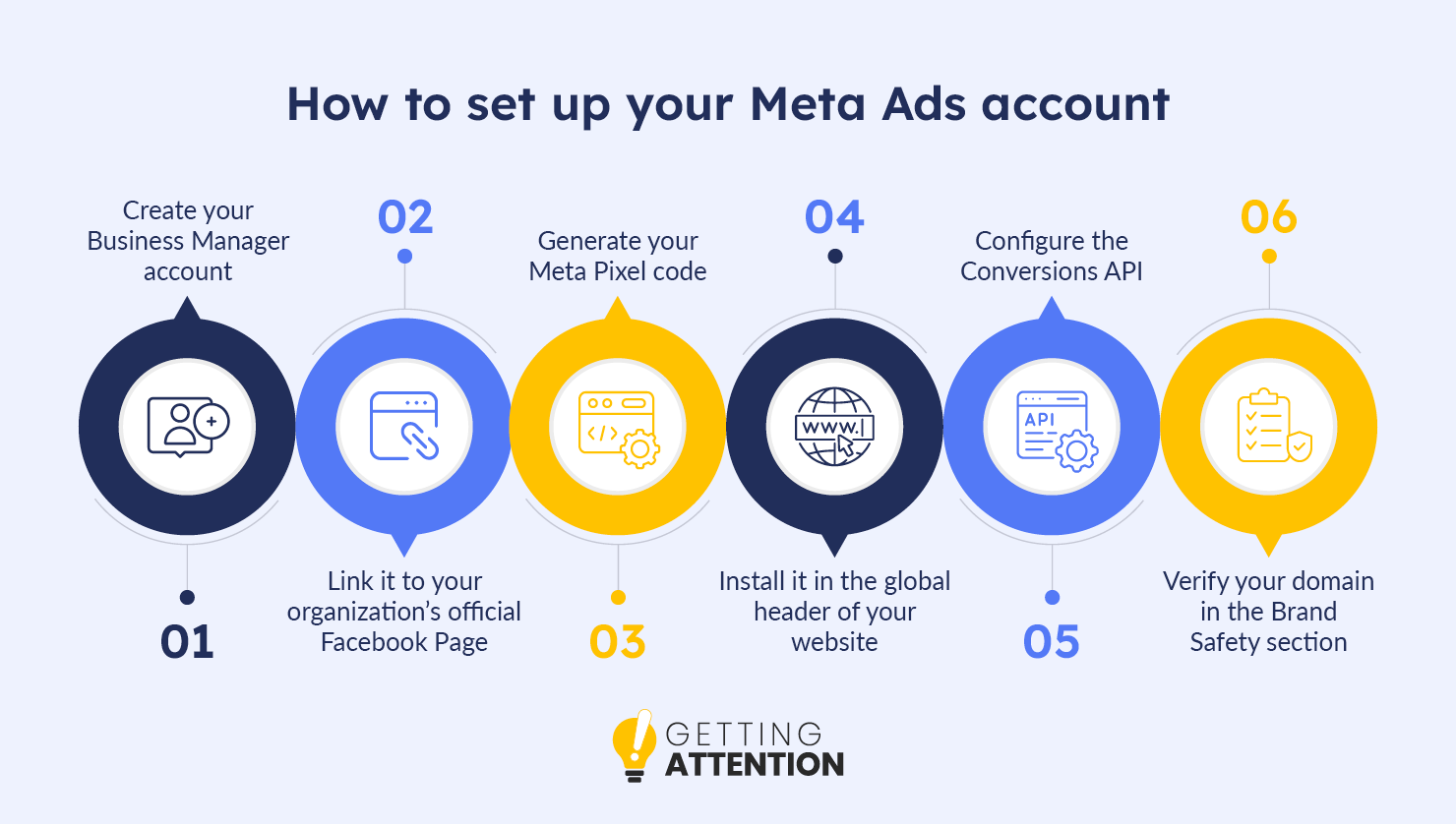
- Create your Business Manager account. Visit business.facebook.com and sign in with your regular Facebook credentials to create an account for your organization.
- Link it to your organization’s official Facebook Page. To link your nonprofit’s existing Facebook page, open “Accounts” in the new Business Manager, choose “Pages,” then select “Add.”
- Generate your Meta Pixel code. In Business Manager, open “Events Manager,” select “Connect Data Sources,” then choose “Web.”
- Install the Pixel in your website’s global header. Take the code from the previous step and add it to your website’s backend. Website builders such as WordPress, Wix, and Squarespace typically offer an “Integrations” or “Header Code” section where you can insert it.
- Configure the Conversions API (CAPI) to set up a secure, server-to-server data connection. Changes to browsers and privacy controls can make the Meta Pixel less reliable at tracking activity. The Conversions API sends information securely from your server straight to Meta’s, helping keep donation measurements consistent despite variations in browser tracking.
- Verify your domain in the Brand Safety section to authorize your custom tracking events. Open Business Manager settings and navigate to Brand Safety > Domains. Enter your website address, then add the verification code Facebook provides to confirm ownership.
What are the main benefits of Meta Ads for nonprofits?
Meta Ads introduces your cause to potential supporters on Facebook and Instagram before they ever search for you, using visual storytelling to turn casual scrollers into long-term advocates. Meta Ads works well for nonprofits because it:
- Builds emotional connections fast: Photos, short video reels, and real impact stories help people feel connected to your cause within seconds.
- Reaches beyond active searchers: Most people don’t type a query into Google until later in their journey. Meta lets you get in front of them well before that point.
- Collects sign-ups in the app: Instant lead forms let people submit a volunteer application or email address without leaving Facebook or Instagram, so you don’t lose them to an extra step on another website.
- Grows with lookalike targeting: Meta’s algorithm finds new users who share the demographics and interests of your current donors, giving you a steady stream of similar prospects.
Pairing visual storytelling with precise audience targeting, Meta Ads helps you build awareness first and then steadily grows your supporter base over time.
Google Ads vs. Meta Ads: A side-by-side comparison
Here’s how the two platforms compare on the points that matter most when you’re planning a budget and a strategy:
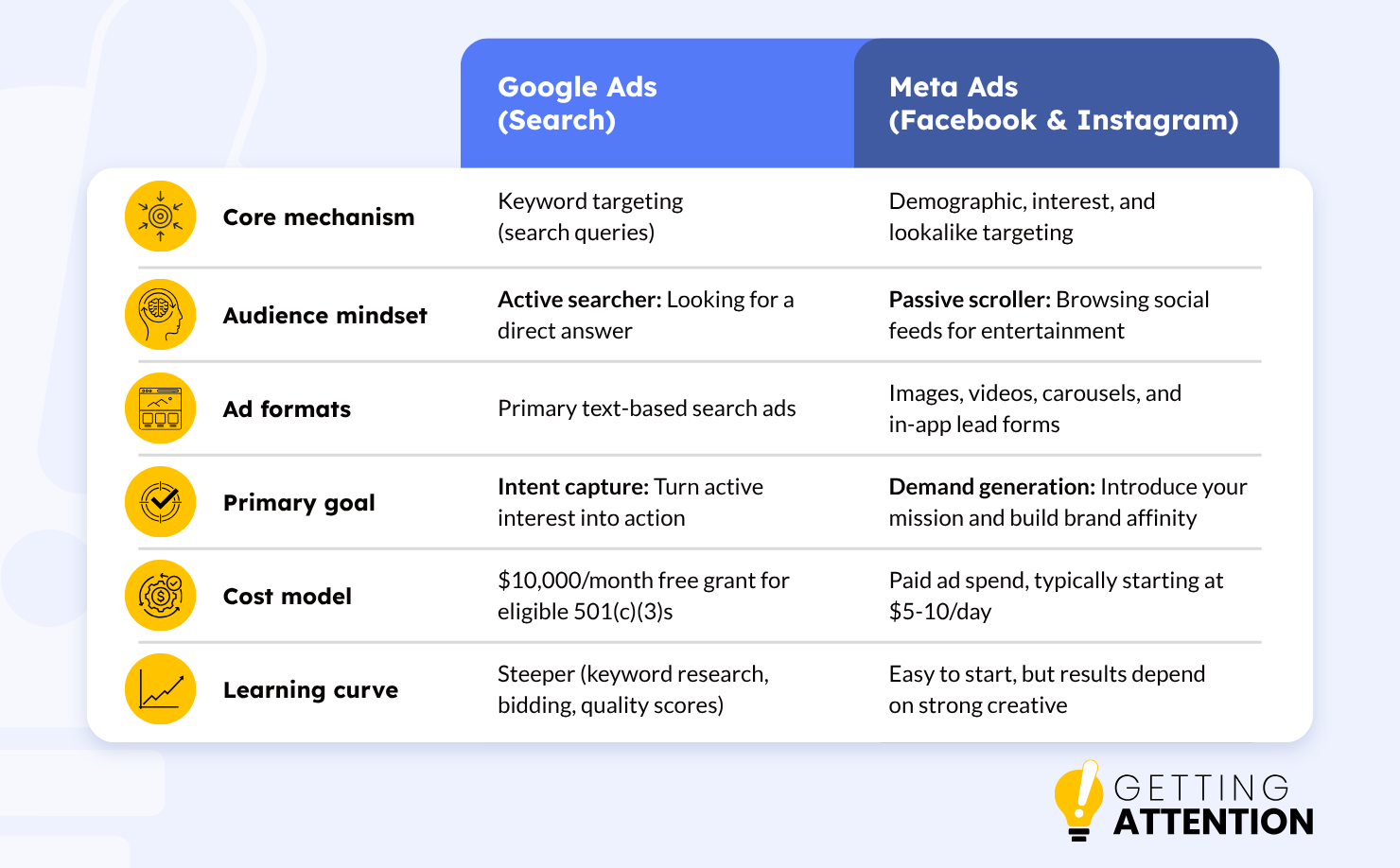
Neither platform wins across the board. Google Ads is the faster route to people who are ready to give, volunteer, or enroll, and the Ad Grant means you can start without spending your own money. Meta Ads works on a longer cycle, but it brings your mission to supporters you couldn’t reach any other way. Your goals, your creative resources, and your grant eligibility should decide where you start.
How Google Ads and Meta Ads work together
You don’t have to pick one. It’s not Google Ads versus Meta Ads, but Google Ads and Meta Ads. The two platforms support each other, and the strongest results come from using both strategically instead of asking a single platform to handle every goal of your nonprofit. Here’s how the two work hand in hand:
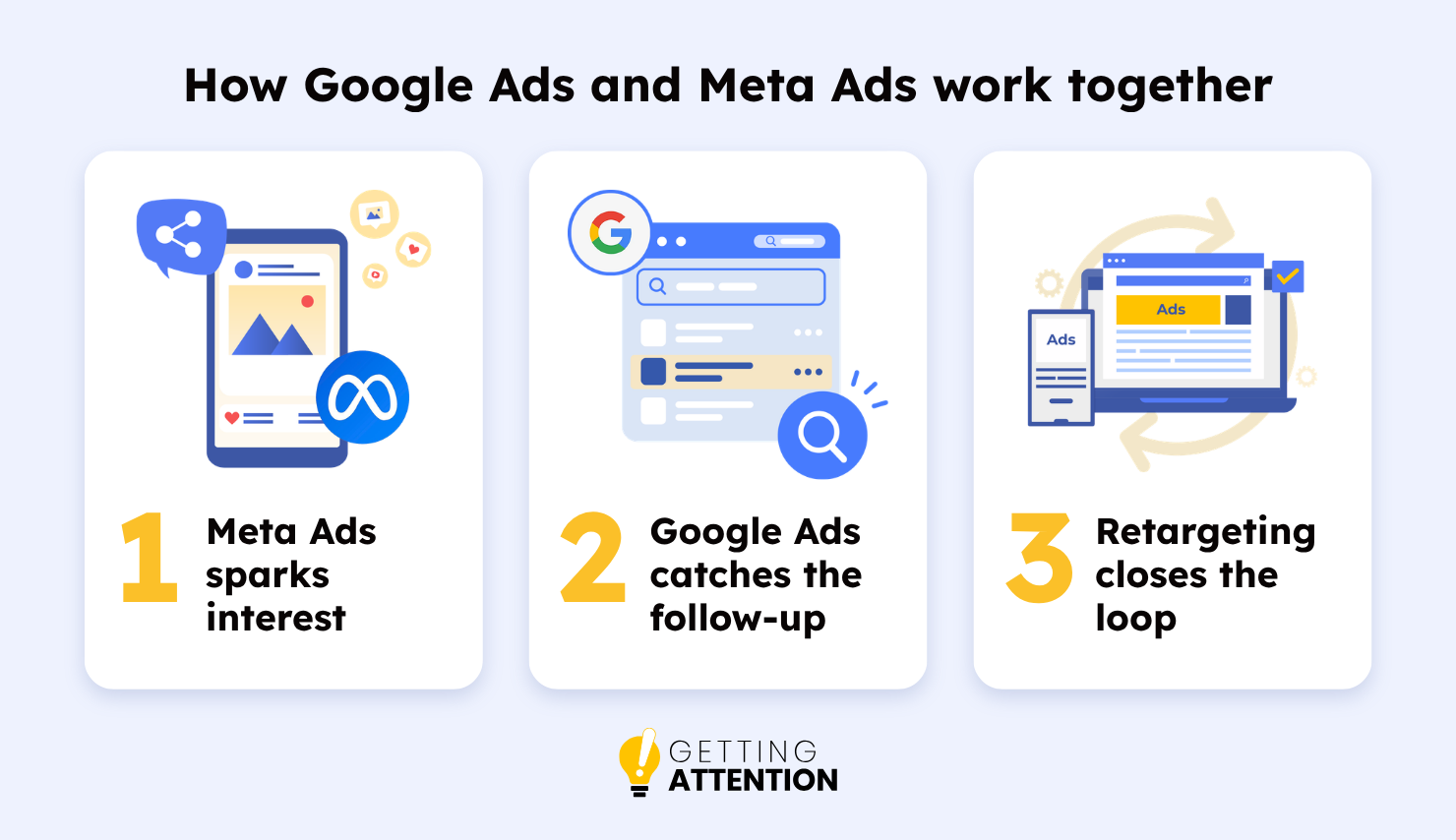
- Meta Ads sparks interest: A visual Meta ad introduces your organization to someone scrolling Instagram and builds first-time awareness.
- Google Ads catches the follow-up: Days later, that same person searches Google for your organization or cause. Your Search ad sits at the top of the page, ready to earn the click.
- Retargeting closes the loop: When someone lands on your site from a Google Search ad, a Meta ad on Facebook can remind them to finish their volunteer application or donation.
If you’re currently running Google Search ads, audit your conversion path data to see which search terms drive high engagement but low initial conversions. Meta retargeting campaigns aimed specifically at visitors who arrived via those terms can significantly increase your overall campaign return.
How Getting Attention maximizes the impact of Google Ads & Meta Ads
Getting Attention helps nonprofits build integrated digital marketing strategies that connect with supporters across search and social media. As a specialized agency dedicated exclusively to mission-driven organizations, we handle technical execution, ongoing campaign optimization, and platform compliance so your team can focus on driving your mission forward.
Google Ads & Ad Grant Impact
Google’s advertising ecosystem calls for specialized platform knowledge and ongoing compliance work. Getting Attention is a certified Google Partner, staffed by former Google employees, so your team doesn’t have to carry the load of creating optimized Google Ads.
Getting Attention can help your nonprofit maximize its Google Ads impact and maintain Grant compliance through these services:
- Initial Google Ad Strategy and Audit: You get a plan built around your top priorities, plus an audit of your current account that shows what’s working and what needs improvement.
- Google Ads Account Setup: Your account receives a solid structure from a team with 5+ years of specialized nonprofit experience across paid accounts and Google Ad Grants.
- Google Ads Creation: Clear messaging, strong visuals, and well-chosen keywords work together to drive ad performance and audience engagement.
- Keyword Research and Audience Targeting: Our team finds the search terms your supporters use and targets demographic, geographic, and remarketing segments so your ad budget goes further.
- Bid Management and Budget Optimization: Our team actively can manage up to $7,000 (in addition to your Ad Grant) per month in paid spend, refining messages, running A/B tests, and using Google AI offerings along the way.
- Conversion Tracking and Reporting: See what your ad spend achieves through tracked key outcomes and regular, transparent reporting.
Dedicated Meta Ads Management
Getting Attention manages yourFacebook and Instagram advertising from strategy to reporting, with the goal of turning casual scrollers into active advocates.
Our team handles every aspect of your Facebook and Instagram campaigns through the following services:
- Strategy and account setup: Get help choosing the right advertising approach and a tailored roadmap for putting it into action.
- Audience targeting: We create ads that reach past website visitors, supporters, and lookalike audiences on Meta platforms.
- Ad creative development: Our team creates visuals, writes copy, and produces monthly ad variations customized for social formats.
- Ongoing management and optimization: We monitor your ad dashboards, reallocate budgets, and adjust copy so your campaigns run efficiently.
- Conversion tracking and reporting: Our team sets up tracking pixels (small snippets of code that measure actions visitors take after clicking an ad) and sends clear monthly ROI reports you can review at a glance.
Combining active search capture with visual social discovery creates a continuous pipeline to attract and retain supporters. Partner with Getting Attention to manage your multi-channel ad strategy, maintain full platform compliance, and turn online engagement into measurable donations, volunteer applications, and program sign-ups!
Frequently asked questions
Which platform is easier for beginners?
Meta Ads usually feels easier at first because the interface is visual and the campaign setup is straightforward. Google Ads has a steeper learning curve: keyword research, bidding strategies, and quality scores all take time to learn. Meta has its own requirements, though. It runs on strong photos and video, so invest in your creative before you launch. If you’d rather not learn it all yourself, a marketing consultant with nonprofit experience can shorten the learning curve on either platform.
Which platform gives faster results?
Google Ads often produces faster direct conversions because the demand already exists. People are searching for a solution right now. Meta Ads takes a longer nurturing cycle, since you’re introducing your nonprofit to people who weren’t looking for it yet.
Is the Google Ad Grant really free?
Yes. Google provides up to $10,000 per month in in-kind advertising to eligible 501(c)(3) nonprofits. However, your account does need active management and a minimum 5% click-through rate (CTR) to stay compliant and keep the grant going.
Which platform is cheaper?
On a cost-per-click (CPC) basis, Meta Ads is generally cheaper, so a smaller budget can reach a broader audience. Google Ads clicks tend to cost more, but they come from people ready to act, so conversion rates are often higher. That can make Google the cheaper option in terms of cost per acquisition metrics, such as the cost of each donation.
Meta Ads, Google Ads, and a strategy that fits your goals
Google Ads and Meta Ads answer different questions. Google answers “who is looking for us right now?” Meta answers “who should know about us?” The nonprofits that get the most from either platform give both channels a clear job and match them to their goal.
A practical way to start: if you qualify for the Ad Grant, launch Search campaigns first, since the grant covers the cost. Pay attention to which searches and landing pages lead to donations or sign-ups and use those findings to shape your Meta creative and audiences. Add a modest Meta budget to your marketing plan to reach people who haven’t heard of you yet, and track results on both platforms so you can see which one deserves a bigger share of your budget over time.
You can also check out these additional resources to help you start your campaign:
- The ultimate Meta Ads guide for nonprofit organizations. Choose from five ad types and set up a campaign structure that makes your budget go further.
- How to choose the right Google Ad Grant agency for your nonprofit. Find out what an agency handles, from applications to compliance and reactivation, and what to look for before you hire one.
- Create a winning nonprofit marketing plan in 8 key steps. Work through eight steps to create a nonprofit marketing plan, from auditing past efforts to building a calendar, and use the free templates to get started.