How to Build, Grow, and Get Your Nonprofit Website Found Online
Last Updated on June 25, 2026
- A nonprofit website builds credibility, drives donations, and serves as your 24/7 digital headquarters.
Read full summary ▾
- Effective nonprofit websites follow specific design principles and must include key pages to convert visitors into supporters.
- The Google Ad Grant provides eligible nonprofits with $10,000/month in free Google advertising to drive mission-aligned traffic.
- SEO and emerging LLM/AI search optimization are now essential strategies for nonprofits to stay discoverable as search behavior evolves.
- Building a nonprofit website is a step-by-step process, and ongoing growth strategies are just as important as the initial build.
This guide goes beyond the basics. You’ll find a curated breakdown of the top 7 nonprofit website examples, with analysis of what makes each one work, along with a practical step-by-step guide to building your own site from the ground up. The article also covers post-launch growth strategies, a dedicated section on optimizing for AI-powered search (a growing frontier most nonprofits are missing), and a look at how Getting Attention helps nonprofits maximize their web presence.
Most nonprofits have a website, but it’s not being used to its full potential to help the organization grow. This is often an issue because a nonprofit’s website is the first place a skeptical potential volunteer looks to see if you’re legitimate, and the most common place a donor goes when they’re finally ready to hit “donate.”
Since your mission is too important to be hidden behind a clunky, outdated interface, we’ve built this guide to help you turn your site into a growth engine. This comprehensive article discusses the steps you need to scale and create an effective nonprofit website that connects your vision with the people who can make it happen.
Table of contents
- Why should nonprofits have a website?
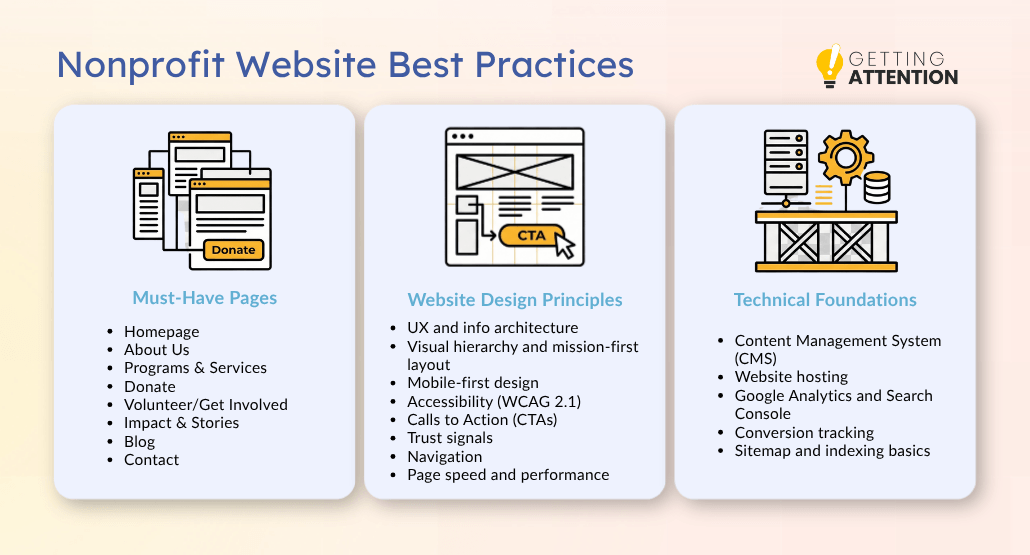
- Best practices: What makes a good nonprofit website?
- What pages does every nonprofit website need?
- What are the key principles of nonprofit website design?
- What are the technical foundations of a nonprofit website?
- Top 6 best nonprofit website examples that will inspire you
- How to create a nonprofit website (a step-by-step guide)
- How to grow your nonprofit website after launch
- How Getting Attention helps nonprofits get more from their website
- Frequently asked questions (FAQs)
Why should nonprofits have a website?
A lot of nonprofit leaders ask us if they really need a high-performing site when they already have a strong social media presence or a loyal local donor base. The answer is a loud yes!
A strong site does the work that other channels can’t. A viral Instagram reel earns you views, but your website is where someone becomes a recurring donor, a long-term volunteer, or a funder. And in a moment when donors research before they give, the absence of a serious site actively costs you credibility, gifts, and reach. Here at Getting Attention, we’ve seen firsthand how a well-built website can strengthen every aspect of a nonprofit’s outreach and fundraising efforts.
These are the specific reasons every nonprofit, no matter the size, needs a real website behind every other channel they use:
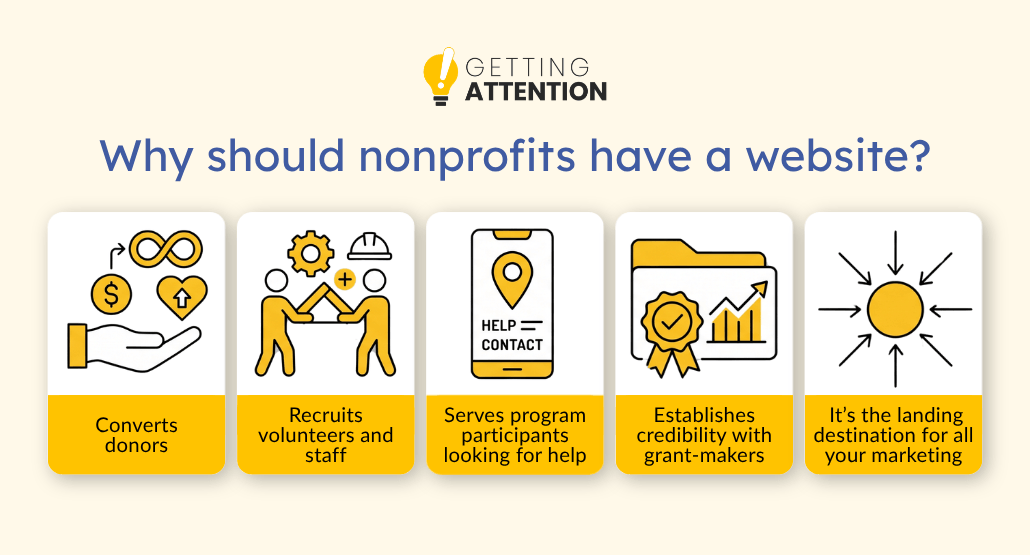
- It converts donors. When you have a high-quality nonprofit website, you remove the friction that stops people from giving. You want the process to be so easy that a donor doesn’t have time to second-guess their decision.
- It recruits volunteers and staff. A modern site shows top talent and dedicated volunteers that you’re a trusted partner and a stable place to invest their time.
- It serves program participants looking for help. If your mission involves providing direct services, your website is often the first point of contact for someone in crisis
- It establishes credibility with grant-makers. Foundations and corporate donors will vet you. They’ll look at your site to see your impact metrics and your leadership team.
- It acts as the landing destination for all your marketing. Think of your email campaigns, social media posts, and Google Ads as the spokes of a wheel. Your website is the hub. Without a solid hub, the spokes have nowhere to go.
Best practices: What makes a good nonprofit website?
Building a “good” website is subjective. Building a “high-converting” website is a science. You don’t need a site that wins design awards – you need one that wins donors.
What pages does every nonprofit website need?
Every site is different, but the core architecture usually stays the same. If you miss these pages, you’re leaving money and engagement on the table.
Homepage
This is your digital front door. It needs to tell people exactly what you do, who you do it for, and what they should do next within the first three seconds.
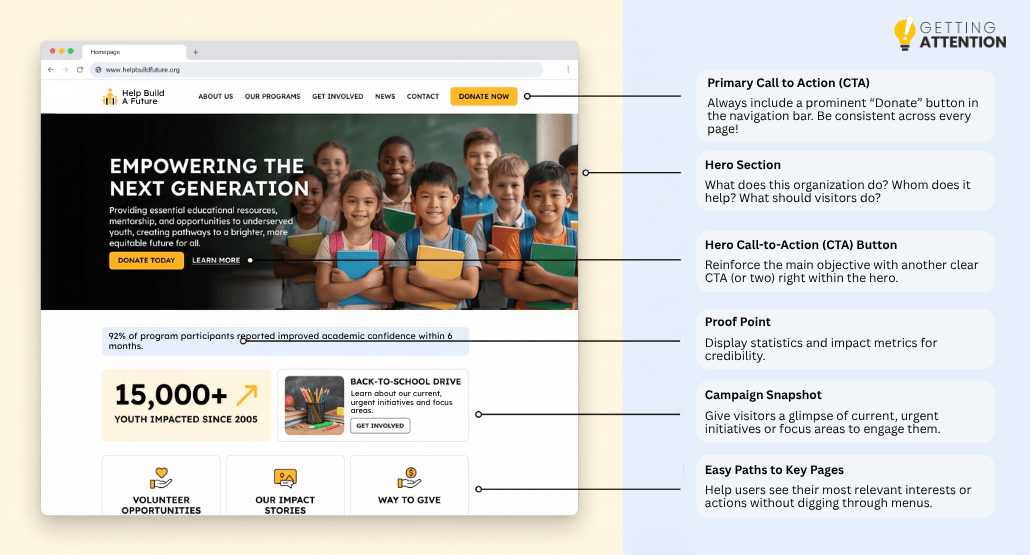
Your nonprofit site’s homepage should contain these:
- Hero Section. Your hero section should answer three questions at a glance:
- What is this organization?
- Who does it help?
- What do you want me to do right now?
- Primary Call-to-Action (CTA). Add a prominent CTA, usually “Donate,” as a button in the top right corner of every page, and again in the hero.
- Content. Below the fold, give visitors three things:
- A one-sentence proof point (numbers served, years operating, lives changed)
- A snapshot of your current campaign or focus
- Easy paths to your most important pages.
About Us
People are more likely to give to people rather than organizations. Use this page to introduce your leadership, your history, and your “why.”
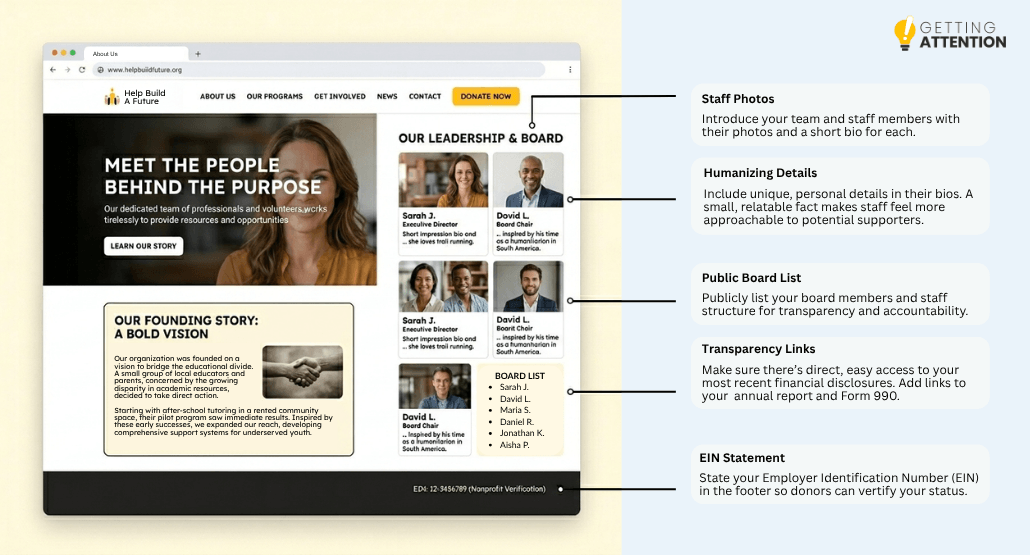
Some helpful tips:
- Include real photos of real staff (don’t use stock images!)
- Add short bios for your executive director and board members, including first names, faces, and one detail that makes each person feel like a real person.
- List your board members publicly to signal transparency and accountability.
- If you have a founding story, tell it like a story: who started this, an issue they saw that they wanted to change, and what happened next.
- Link to your most recent annual report and your Form 990.
- State your EIN somewhere on the page (usually in the footer) so people can verify your nonprofit status.
Programs & Services
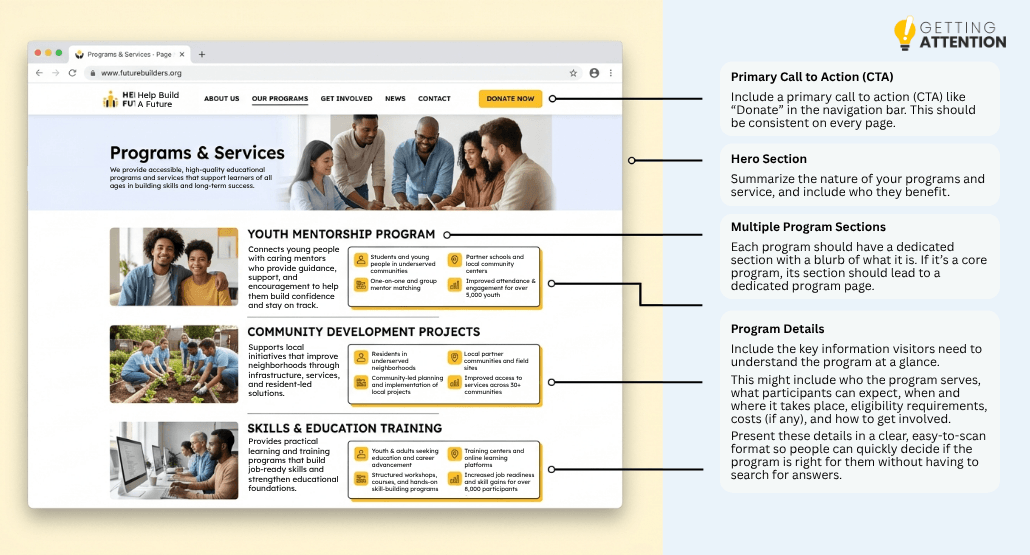
This is where you prove your expertise. It’s where you can be specific about what you do. If you have five different programs, give each one its own section so people can understand the breadth of your work.
For each program, answer four questions plainly:
- Who is it for?
- How does it work, and what does it actually do?
- Where does it operate?
- What results has it produced?
For example, “We provide educational support to underserved youth” doesn’t tell the reader much. However, “We run a free after-school tutoring program for K-8 students in three Brooklyn neighborhoods, and 87% of our participants improved at least one letter grade last year,” says enough to make your nonprofit stand out among similar organizations.
Donate
This page should be the simplest part of your site. One column, minimal distractions, and a clear “Give” button. But it’s also the most important, trust-building one.
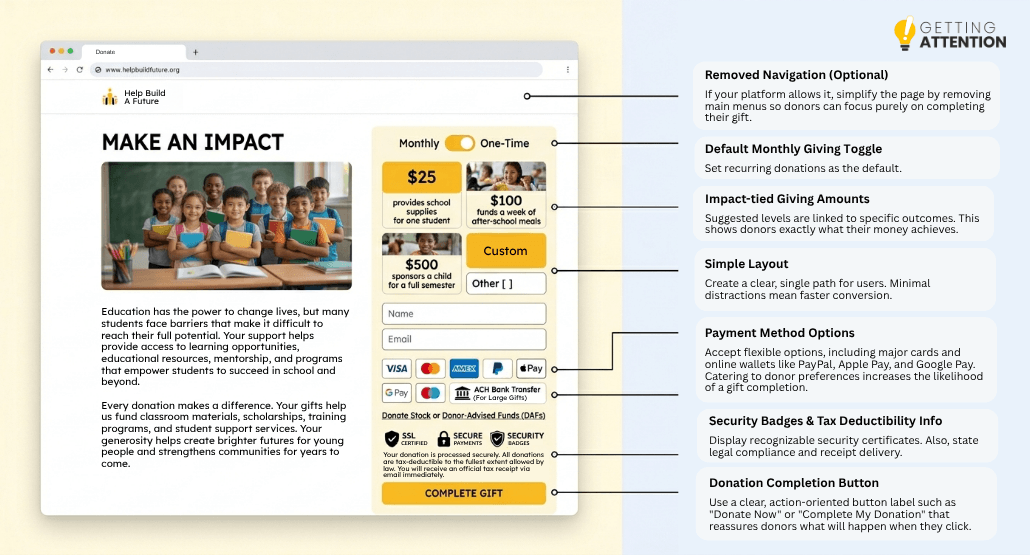
Follow these tips for an effective donation page:
- Use suggested giving amounts tied to concrete impact. For example: “$25 provides school supplies for one student. $100 funds a week of after-school meals. $500 sponsors a child for a full semester.”
- Default the form to monthly giving with a toggle to one-time giving
- Accept more than credit cards. Add PayPal, Apple Pay, Google Pay, and ACH for larger gifts.
- For donors over a certain threshold, include stock and donor-advised fund options.
- Display security badges and a brief note about how donations are processed.
- Mention tax-deductibility and tell people they’ll get a receipt by email.
- Remove your main navigation from this page if your donation platform allows it; the only action that matters here is finishing the gift.
Volunteer/Get Involved
Make it easy for people to volunteer their time and get involved in your activities. If they have to download a PDF, print it out, scan it, and email it back, you’ve already lost them. It’s important to remember that “volunteer” isn’t just one thing. Often, there are a variety of ways a person can get involved.
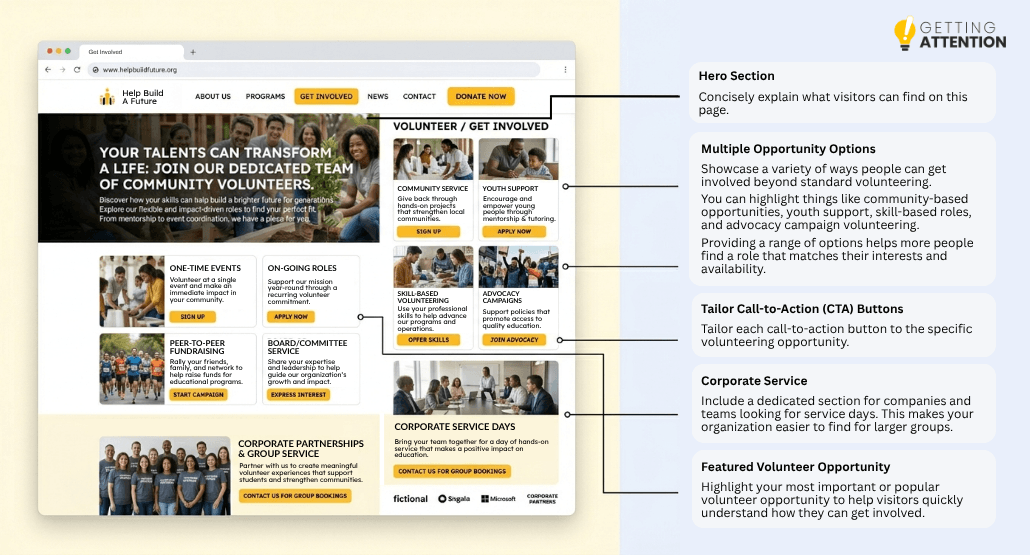
To make sure this information is properly laid out, do the following:
- Lay out the actual ways people can plug in: one-time events, ongoing roles, skills-based volunteering (legal, design, accounting, IT), advocacy, peer-to-peer fundraising, and board or committee service.
- Give each option a short description, a time commitment, and a way to sign up.
- Include a section for corporate partnerships and group volunteering. Companies actively look for service days, and you want to be findable when they search.
- Make sure someone on staff actually responds to volunteer inquiries within a few days.
Impact & Stories
This is the heart of your site. It’s the stories that really make people want to support a nonprofit organization.
Pair every story with a data point, and every data point with a story. A single number (“4,200 meals served last year”) feels abstract until it sits next to one person’s experience. A single story feels anecdotal until a number proves it’s representative. Use both, and you get something that hits the brain and the heart at the same time.
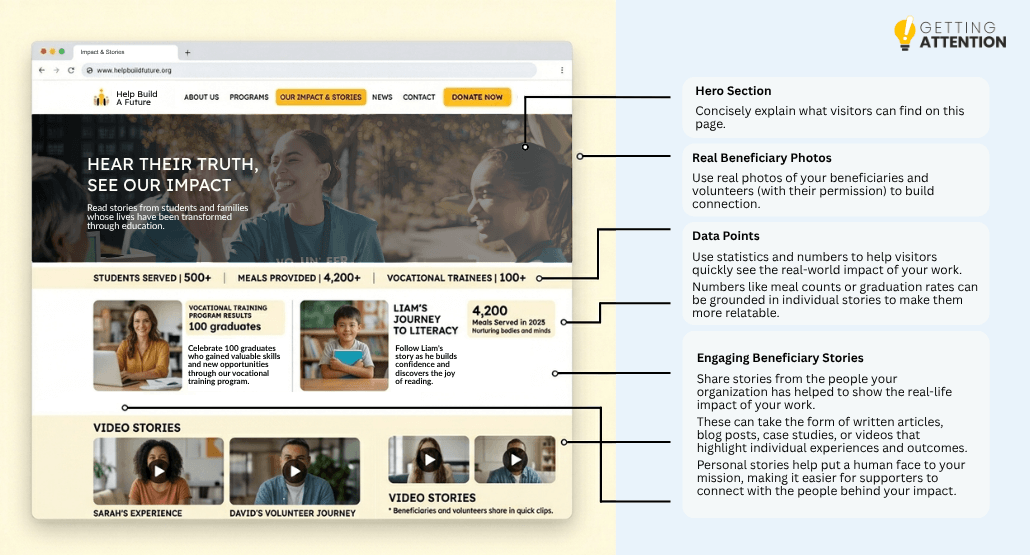
Best practices in creating your Impact & Stories pages include:
- Get written consent before publishing anyone’s story or photo, especially for clients in vulnerable situations.
- Change names if you need to, and say so.
- Use illustrations or infographics wherever possible. In a pinch, a stock image can work, but donors connect most with seeing your work in action.
- Add short video testimonials if you have the capacity. Even a 60-second phone-recorded clip from a beneficiary or volunteer outperforms a polished essay.
Blog
Aside from using blogs to update your supporters on your organization’s most recent news and events, you can also treat them as an opportunity to increase your online search presence and visibility. This is where you use your primary keyword and other terms to show up in search results when people are looking for help or ways to give in your specific sector or niche.
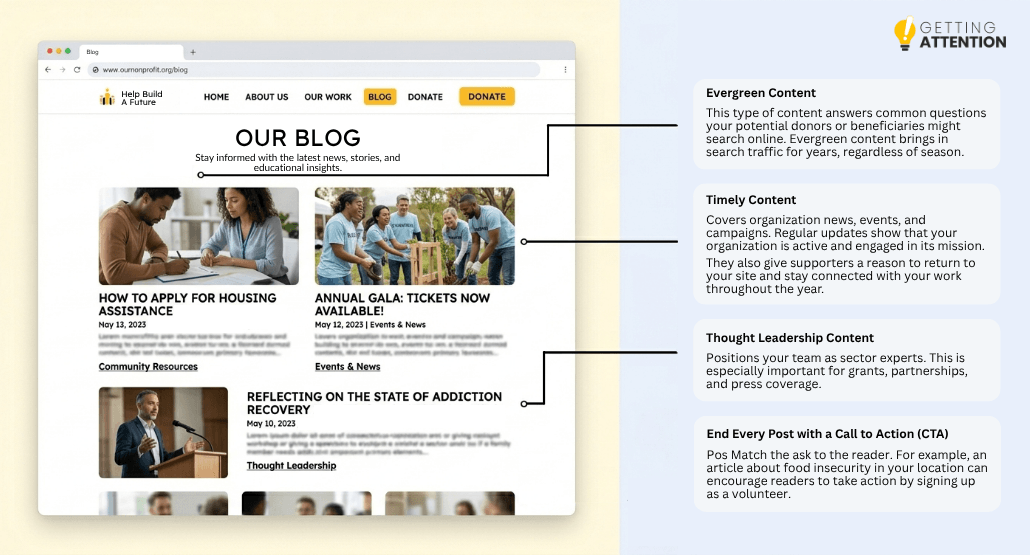
Your blog can be broken down into these categories:
- Evergreen content answers questions your audience searches, such as “how to apply for housing assistance in [your city]” and “what to do if a family member needs addiction recovery support”. This brings in traffic for years, no matter the season.
- Timely content covers your news, events, and campaigns, and gives donors and partners something to share.
- Thought-leadership content positions your team as experts in your field, which matters for grants, partnerships, and press coverage.
And don’t forget to end every post with a call to action that matches the ask to the reader. For example, a post about how to spot signs of food insecurity might end with a volunteer signup, and a post about your annual gala might end with a ticket link.
Contact
Like any other website, you need a page where visitors can find your contact information. Aside from making it easier for people to reach you, it builds trust and shows you’re a real organization with real people behind it.
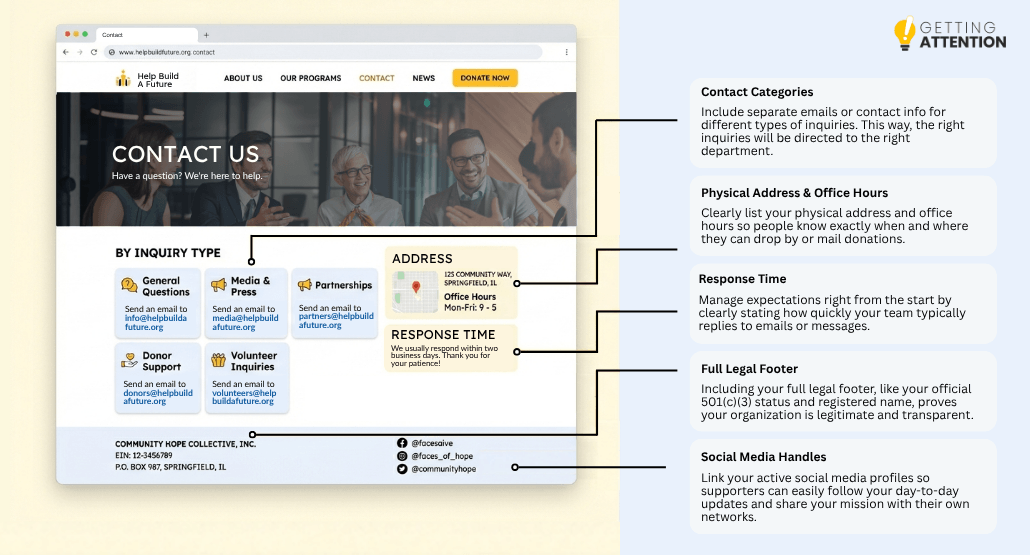
Include the following:
- A phone number, ideally as a clickable link for mobile users
- An email address (or multiple)
- A physical address.
Some other specific tips to optimize your contact page include:
- Break out contacts by inquiry type when it makes sense: general questions, media, partnerships, donor support, and volunteer coordination.
- Set expectations about response time and then meet that commitment.
- Include your full legal name, EIN, and mailing address in the footer of every page, not just the contact page.
- List your social media handles in the footer or header.
- Add office hours if you have a physical location people might visit.
What are the key principles of nonprofit website design?
When a visitor lands on your homepage, you want them to find what they need in seconds and walk away with a clear next step. To make sure your visitors are met with a design that will increase their site visit length, check out our tips below.
User experience (UX) and information architecture
For best results, follow a three-click rule: a user should be able to find any piece of information on your site in three clicks or fewer.

To get to that point, follow these recommendations:
- Map out who’s actually visiting your site and what they came for. Most nonprofits have at least four user types with completely different goals: potential donors evaluating whether to give, beneficiaries looking for help, volunteers wanting to plug in, and funders or partners doing due diligence. Each of these people should land on your homepage and find what they need as soon as possible.
- Build your information architecture around those visitor-specific journeys.
- A donor needs a fast path to impact stories, financials, and the donate button.
- A beneficiary needs an obvious “Get Help” path with no fundraising friction in their way.
- A volunteer wants a signup form, not a mission statement.
Read more: Faster UX on Your Website: A Crash Course for Nonprofits
Visual hierarchy and mission-first layout
Your most important information should be the biggest and brightest. If your “Donate” button is the same color and size as your “Read More” button, you have a hierarchy problem.
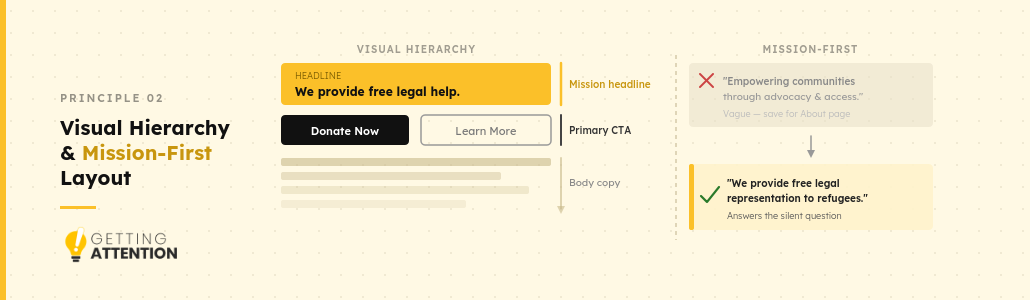
Visual hierarchy is how the eye knows where to look. It comes from four levers: size, color, contrast, and white space. Important things to remember:
- Headlines should be noticeably bigger than body text.
- Primary CTAs should be the boldest color on the page.
- Secondary actions (“Learn More”) should sit visually behind primary actions (“Donate”).
- Give your most important elements room to breathe, and make sure they don’t end up buried in a wall of text.
A mission-first layout means the first thing a visitor reads should answer the question they walked in with. For example, if their question is, “What does this organization do, and why should I care?” the first text that should greet them is, “We provide free legal representation to refugees in the Midwest.”
Read more: Nonprofit Website Design Made Easy: A Digital Guide
Mobile-first design
More than half of your traffic is probably coming from a phone. If your site is hard to use on a small screen, you’re essentially turning away half of your potential supporters. A mobile-first design means designing your site for the phone first, and then expanding for desktop.
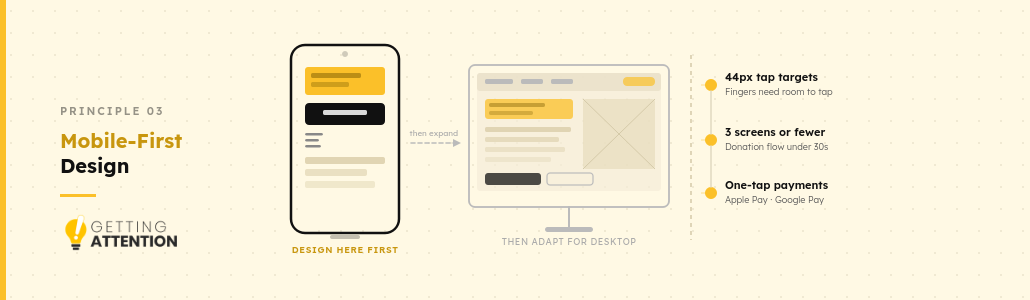
What does that mean in practice?
- Tap targets (any element on a screen that a user interacts with using their finger) should be at least 44 pixels tall so users can accurately select links or buttons.
- Opt for simplified menus that collapse into a hamburger icon.
- Your donation forms should work with one thumb. Short fields, big buttons, Apple Pay and Google Pay enabled so people don’t have to type a 16-digit credit card number on a tiny keyboard.
Read more: Mobile Optimization: 5 Reasons it Matters for Nonprofits
Accessibility (WCAG 2.1)
Your site needs to be usable by everyone, including people with visual or hearing impairments. WCAG 2.1 Level AA is the standard most nonprofits should target.
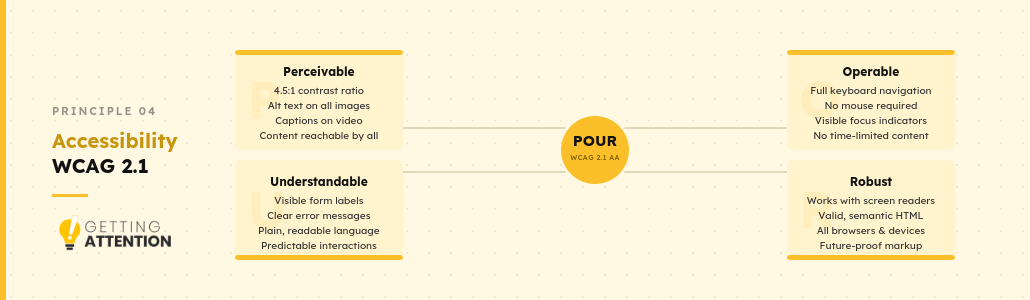
The practical requirements are as follows, also known as known as POUR:
- Perceivable
- Operable
- Understandable
- Robust
Run your site through a free scanner like WAVE or Axe DevTools to catch the obvious issues, then work with a developer to fix them properly. Also, add an accessibility statement to your footer explaining what standards you follow and how someone can request accommodations or report a barrier.
Read more: 501(c)(3) Website Requirements
Calls to Action (CTAs): Contrast, language, and placement
Your story, your design, and your stats exist to earn a click on your call-to-action (CTA) button. If your CTAs are weak, invisible, vague, or buried, then you’ve essentially built a good funnel that ends in a brick wall.
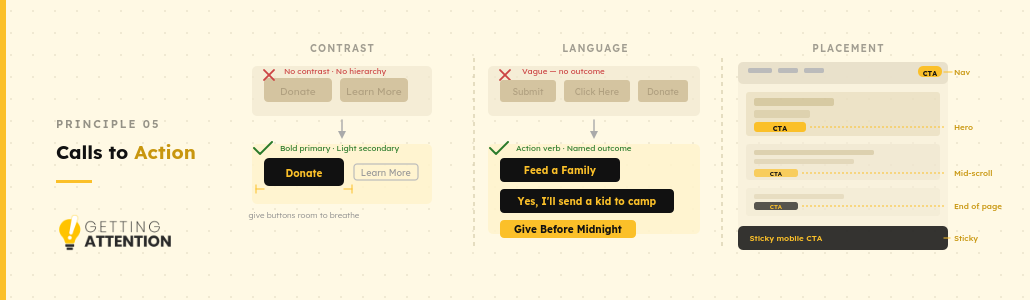
Contrast: Make the button impossible to miss
- Pick one bold, brand-distinct color for your primary CTA. Keep it consistent across every page!
- Maintain a contrast ratio of at least 4.5:1 between the button color and the text on it, so it’s readable and accessible.
- Give buttons breathing room. White space around a CTA makes it feel important.
- Make primary CTAs visually heavier than secondary ones. If “Donate” and “Learn More” are the same size and color, you have a tie.
Language: Tell them what they get
- Start with an action verb: “Sponsor,” “Feed,” “Protect,” “Volunteer,” “Send.”
- Name the outcome: “Feed a Family” beats “Donate $50.”
- Use first-person framing for emotional pages: “Yes, I’ll help send a kid to camp” often outperforms a third-person ask on donation appeals.
- Signal urgency when the situation actually warrants it: “Give Before Midnight” for year-end campaigns.
Placement: Meet people where motivation peaks
- In the top right of your navigation on every page.
- In your hero section.
- At the end of long pages, where a reader has just finished being moved by your content.
- On long-form pages like impact stories or program descriptions, repeat a CTA roughly every screen of scroll.
- As a sticky button on mobile, anchored to the bottom of the screen where the thumb naturally rests.
Trust signals
Most first-time donors won’t read your full annual report or call your office to check you out. They’ll scan your site for two or three signals that confirm you’re legitimate, and then decide in seconds whether to give.
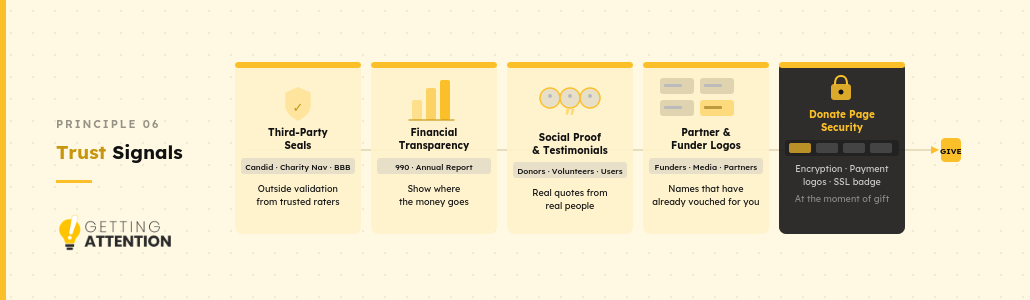
Trust signals fall into five buckets. The strongest sites use all of them:
- Third-party seals and ratings
- Financial transparency
- Publish your IRS Form 990 prominently
- Show a simple spending breakdown
- Annual impact reports with audited financials
- Social proof and testimonials
- Named donor testimonials with photos
- Beneficiary stories
- Volunteer and staff voices
- Media coverage pull quotes
- Partner, funder, and media logos
- Institutional funders
- Corporate partners
- Media that has covered you
- Awards and recognitions
- Donate page security signals
- SSL padlock and HTTPS
- Payment processor logos
- PCI-DSS compliance note
- Privacy policy link
A visitor moving from page to page should pick up trust signals at every stop, until giving feels like the obvious next step rather than a leap of faith.
Navigation
When navigation works, visitors don’t notice it – they just glide from page to page, finding what they need. When it doesn’t, they bounce. The secret is smart structuring.
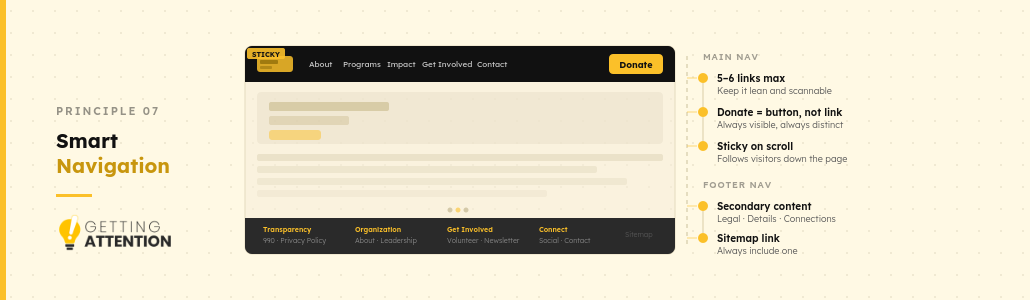
Main navigation: Keep it lean
- Stick to the essentials: About, Programs, Impact, Get Involved, Donate, Contact. Most nonprofits don’t need more.
- Use language that your audience actually uses.
- Make your primary CTA (usually Donate) a button, not just another text link.
- On mobile, collapse the rest into a hamburger menu, but keep the Donate button visible at all times.
- Use a sticky or fixed nav bar that follows visitors as they scroll.
Footer navigation: Where the rest lives
- Transparency and legal
- Organizational details
- Secondary content
- Ways to stay in touch (e.g., social media links and newsletter signup)
- A sitemap link
Page speed and performance
Google rates every page on three specific metrics, collectively called Core Web Vitals. They directly affect your search rankings and your visitor experience. Run your site through Google PageSpeed Insights to see where you stand (aim for a mobile score above 80, but most nonprofit sites start in the 30s or 40s).
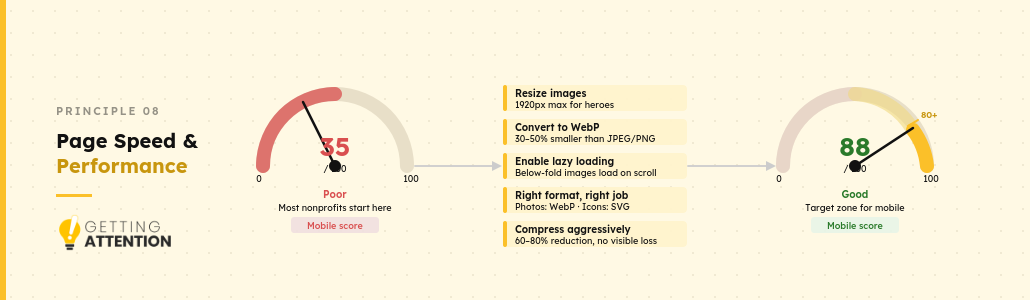
Some recommended ways to improve your page speed and performance include:
- Resize images to the actual dimensions before uploading (usually 1920px wide for hero images, much smaller for thumbnails).
- Convert to WebP because these files are 30–50% smaller than JPEGs and PNGs.
- Enable lazy loading for images below the fold.
- Compress images aggressively. Tools like TinyPNG, Squoosh, or ShortPixel can cut file sizes by 60-80% with no visible loss.
What are the technical foundations of a nonprofit website?
You don’t need to be technical to make smart decisions about any of your site’s technical foundations. You just need to know enough to ask the right questions of your developer, contractor, or tech-savvy volunteer.
Content Management System (CMS)
A CMS is a user-friendly interface that sits on top of a website’s code, allowing people to edit text, upload photos, and change layouts without needing to be a programmer.
See how the big players stack up:
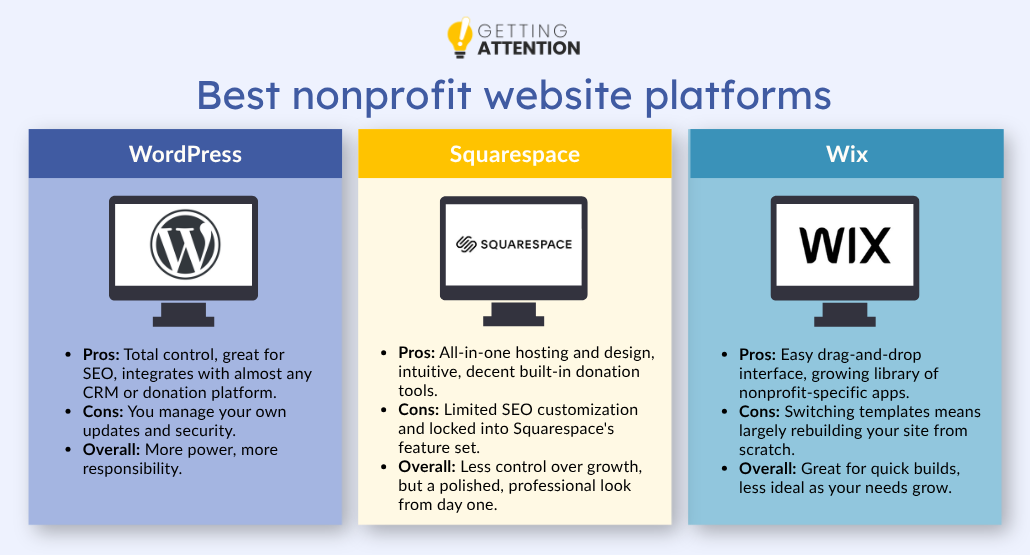
WordPress: The power-user’s choice
WordPress powers a huge chunk of the internet, and for good reason. It’s incredibly flexible, and if you want a specific feature, there is almost certainly a plugin for it.
- Pros: Total control, great for SEO, and integrates with almost every CRM or donation platform.
- Cons: You have to manage your own updates and security. It has a steeper learning curve than “drag-and-drop” builders.
- Overall: You get more power, but you take on more responsibility.
Squarespace: For the design-conscious team
If you don’t have a dedicated designer and you need something that looks beautiful out of the box, Squarespace is usually the winner.
- Pros: All-in-one hosting and design, very intuitive, and has decent built-in donation tools.
- Cons: It’s harder to customize the technical SEO elements, and you’re limited to the features Squarespace chooses to offer.
- Overall: Less control over how your site grows in exchange for a polished, professional look from day one.
Wix: The middle ground
Wix has come a long way in recent years. It offers more flexibility than Squarespace but is easier to use than WordPress.
- Pros: Very easy drag-and-drop interface and a growing library of nonprofit-specific apps.
- Cons: Once you choose a template, it’s hard to switch to a different one without rebuilding a lot of your content.
- Overall: Great for quick builds, but can feel cluttered as your site grows.
Website hosting for nonprofit organizations
Hosting is where your website actually lives, or the servers that deliver your pages when someone types in your URL.
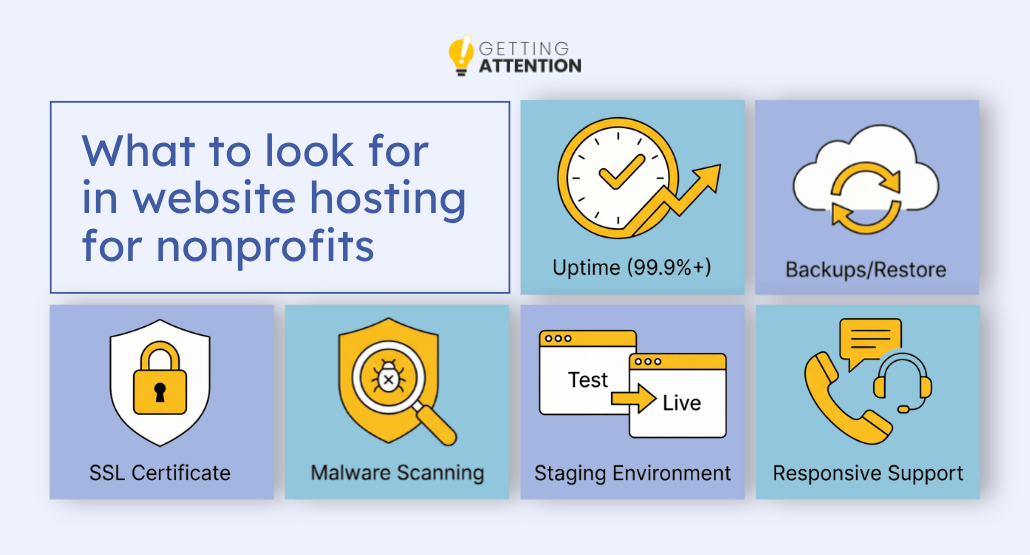
What to look for:
- 99.9%+ uptime guarantee. Anything less means hours of potential downtime per month.
- Daily automatic backups with one-click restore. Non-negotiable as your site grows, because you can’t risk losing all your infrastructure.
- Free SSL certificate (required for HTTPS, which Google and donors expect).
- Malware scanning and removal included.
- A staging environment so you can test changes before pushing them live.
- Responsive support. Live chat or phone is ideal, not just an email ticket queue.
TechSoup offers deeply discounted, and sometimes donated, technology for verified nonprofits, charities, and libraries. We’re talking up to 90% off software, hardware, and digital services from major brands like Microsoft, Adobe, Zoom, AWS, Intuit, and Dropbox. That includes cloud hosting credits too: TechSoup has a dedicated AWS Credits Program for nonprofits through their AWS partnership.
Membership is free to join, you just need to verify your nonprofit status. Once you’re in, you get access to their full product catalog, usually paying only a small admin fee (typically under 10% of retail value). Check their product catalog to see what’s available before paying full retail anywhere else!
Google Analytics and Search Console
If you aren’t measuring it, you can’t improve it. Google Analytics tells you what people are doing on your site, and if they came in through organic search, Search Console tells you how they found you in the first place. Both are free and non-negotiable for any serious organization.
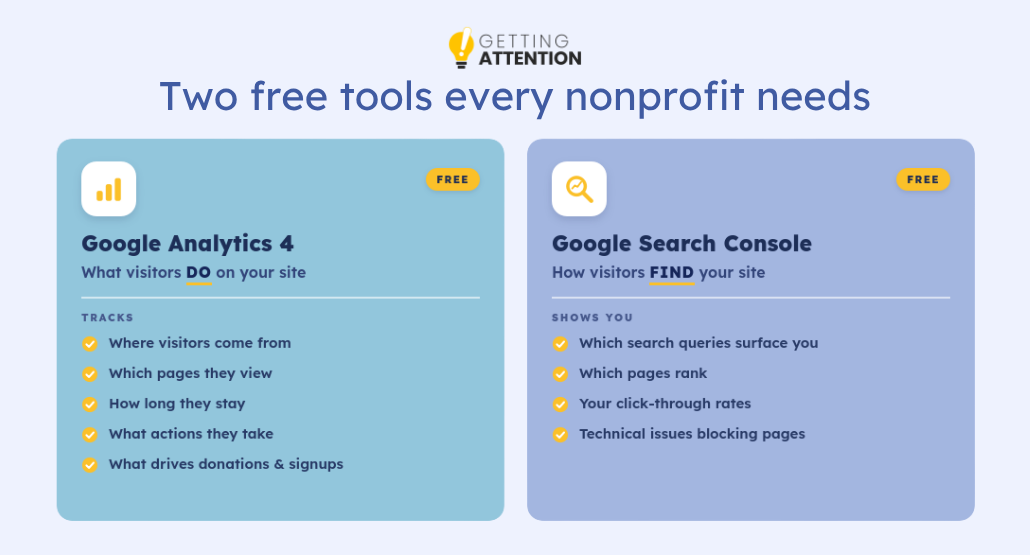
- Google Analytics 4 (GA4) tracks visitor behavior on your site: where they came from, which pages they visited, how long they stayed, what actions they took, and which traffic sources actually produce donations or signups.
- Google Search Console tracks how your site performs in Google search. It lays out which queries surface your pages, which pages rank, what your click-through rates are, and what technical issues are blocking pages from showing up.
Conversion tracking
A conversion is any action measurable online that matters to your organization: a completed donation, a newsletter signup, a volunteer form submission, an event registration, or a contact form sent. Without tracking conversions, you can see traffic, but you can’t see how it connects to results, which is the only thing that ultimately matters.
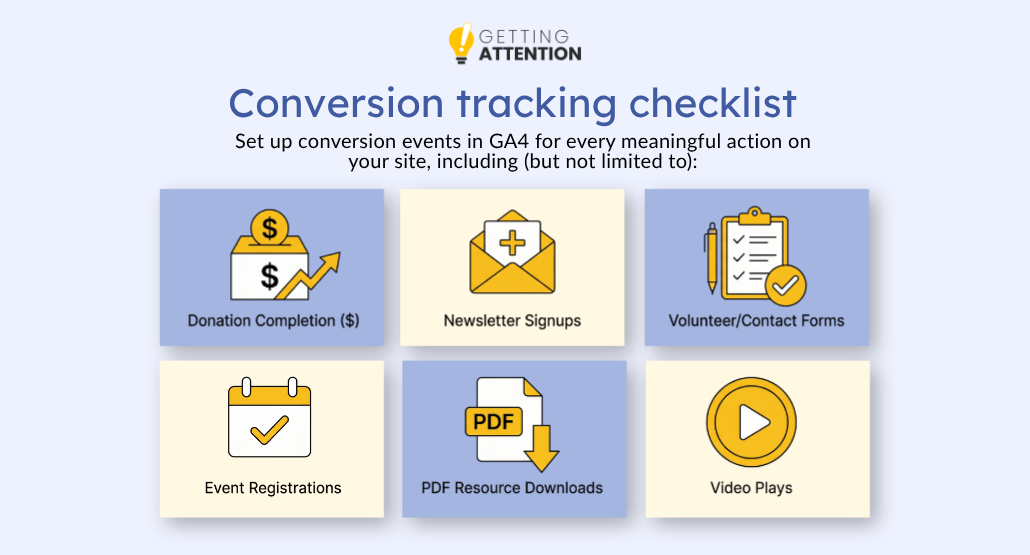
Set up conversion events in GA4 for every meaningful action on your site, including (but not limited to):
- Donation completions (tied to dollar amount when possible).
- Newsletter and email list signups.
- Volunteer or contact form submissions.
- Event registrations.
- PDF downloads of major resources.
- Video plays on key impact pages.
If you’re running Google Ads, Meta Ads, or any other paid campaigns, connect those platforms to your conversion data so you can see which ads actually produce donors, not just clicks.
Sitemap and indexing basics
A sitemap is a simple file that tells Google which pages are on your site. Without it, search engines might miss some of your best content. Indexing is the process by which Google actually adds those pages to its search results.
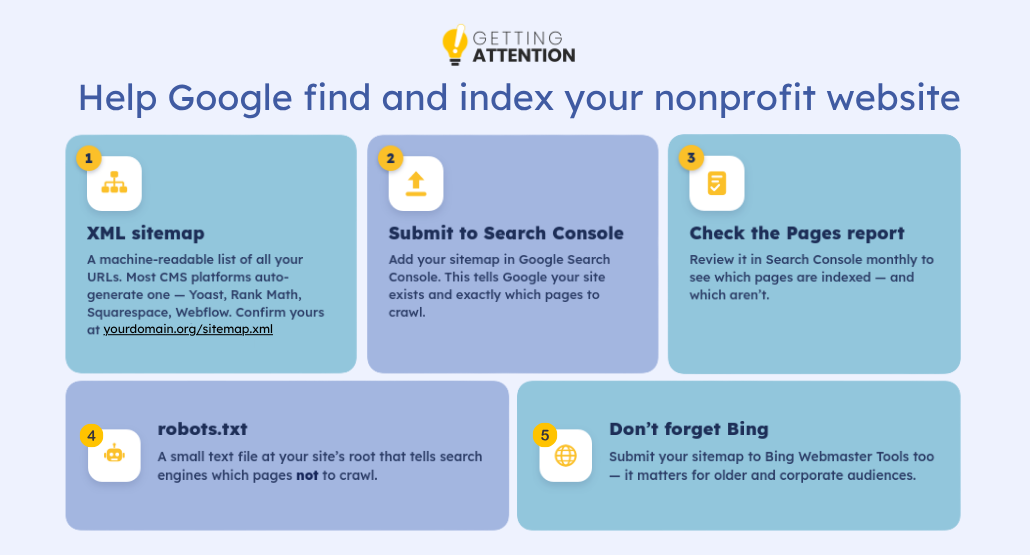
A few points worth knowing:
- An XML sitemap is a machine-readable list of your site’s URLs. Most modern CMS platforms generate one automatically, like WordPress with Yoast or Rank Math, Squarespace built-in, and Webflow built-in. Confirm yours exists at yourdomain.org/sitemap.xml.
- Submit your sitemap to Google Search Console. This step signals Google that your site exists and tells it exactly which pages to crawl. While not strictly required (since Google will eventually crawl on its own), it can help expedite pages appearing in Google’s index.
- Check the “Pages” report in Search Console monthly to see what’s indexed and what’s not.
- robots.txt is a small text file at the root of your site that tells search engines which pages NOT to crawl. We recommend using this only sparingly – for instance, for back-of-house pages like account logins or other pages. Generally speaking, banning crawlers risks more than it gains.
Top 6 best nonprofit website examples to inspire you
Nonprofit websites have to do things most websites never need to worry about, including building donor trust from scratch, mobilizing volunteers, proving impact, serving crisis-affected beneficiaries, and making the case for a cause all at once.
We picked one standout example for each of the core things a nonprofit website needs to get right:
- Donation infrastructure
- Trust and transparency
- Impact storytelling
- Community engagement
- Advocacy
- Multi-stakeholder navigation
Each one does something specific well enough that you can borrow from it directly for your own site!
Charity: Water – Donation infrastructure
If you want to see what a nonprofit donation experience looks like when it’s been carefully thought through, charity: water is the place to start. The site is built around one core donor fear: will my money actually reach anyone?
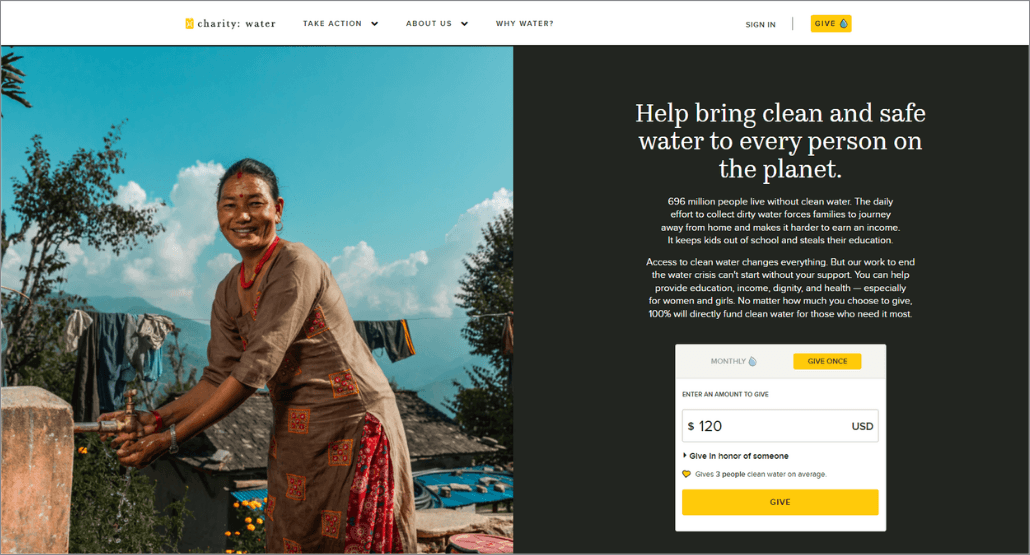
Their 100% Model (every public dollar goes directly to water projects, with operating costs covered by a separate private donor group) is mentioned right before the donation form, and also gets its own dedicated page that explains exactly how the model works, names the people funding it, and links to audited financials.
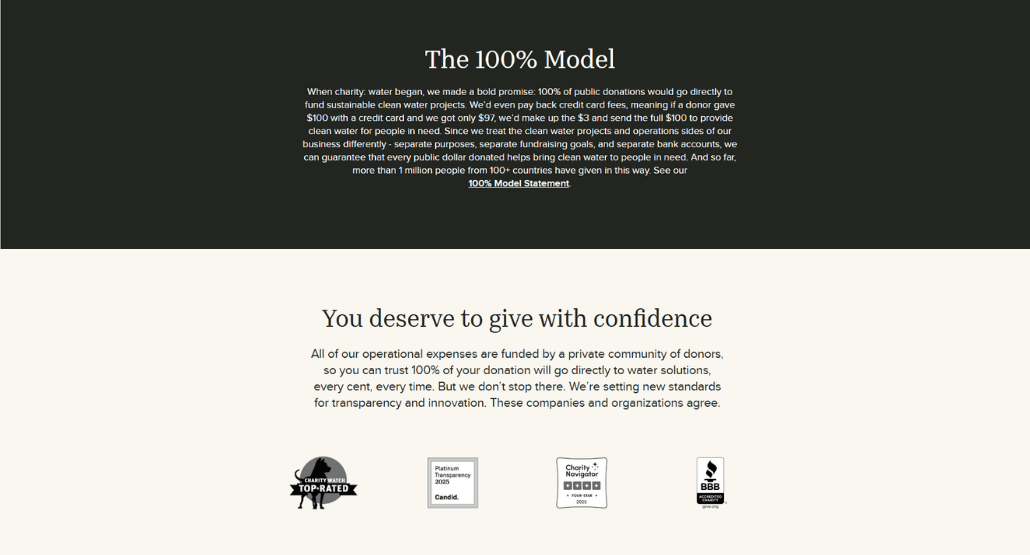
Third-party credibility badges from Charity Navigator, CharityWatch, and the BBB appear directly on the donation page, right where donor hesitation is most likely to occur, rather than tucked away in the footer. The page even includes a “You deserve to give with confidence” heading, addressing potential concerns before making an ask.
Together, these elements help reduce uncertainty in the giving process, making visitors more likely to complete a donation.
GiveWell – Trust and transparency
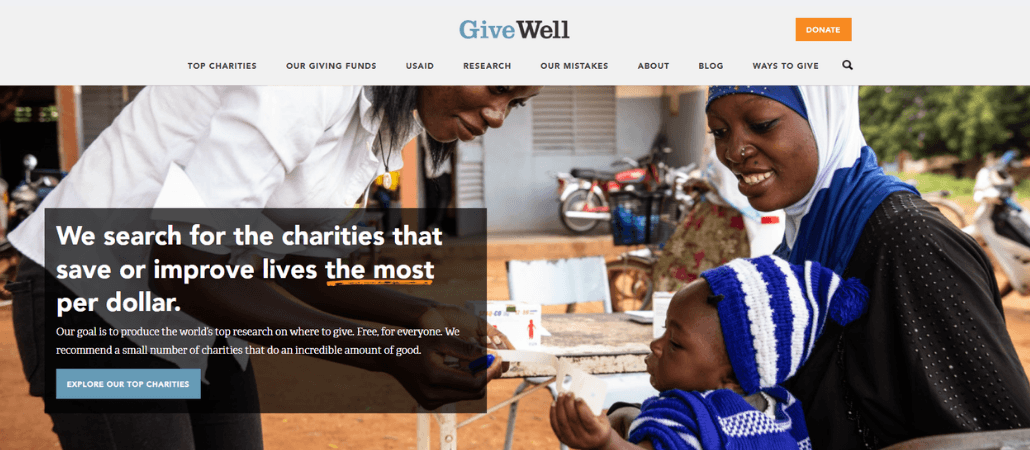
GiveWell is a nonprofit that researches and recommends other charities, which means their credibility is their product, and their site reflects that. They publish exhaustive research reports on every charity they evaluate, including the methodology, the uncertainty, and the limitations of their own analysis.
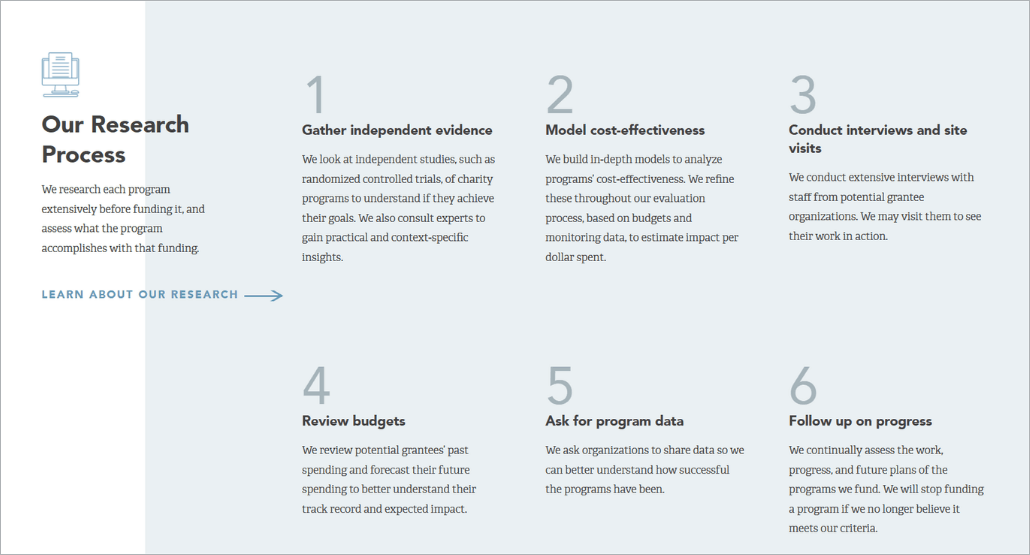
For nonprofits wondering how much transparency is enough, think about whether you’re giving donors the information they need to give with confidence. Even small moves in this direction, like including a clear breakdown of how donations are spent, an impact report that acknowledges what didn’t work alongside what did, and clearly laid-out financials, build the kind of trust that turns a one-time donor into a long-term supporter. More content is generally better in this regard.
GiveWell just happens to show what that looks like taken all the way.
St. Jude Children’s Research Hospital – Impact storytelling
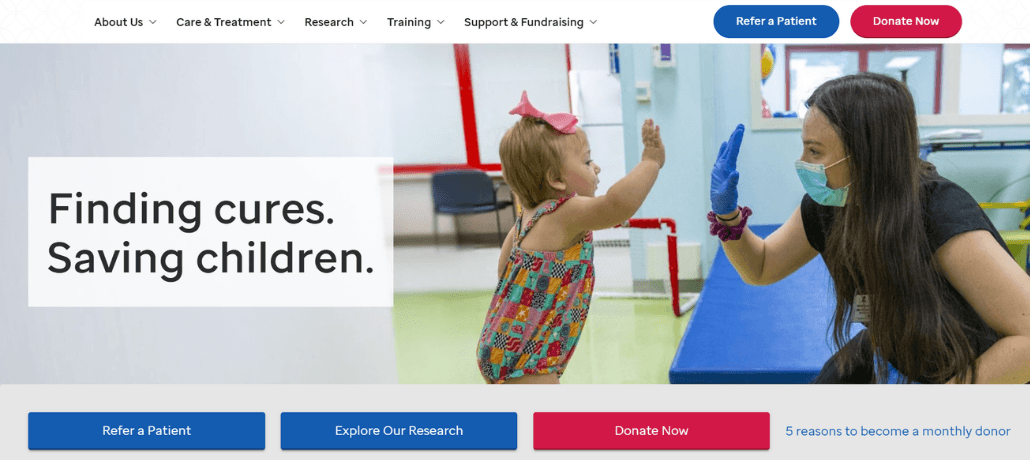
St. Jude Children’s Research Hospital‘s website conveys its mission before asking you to support it. By the time a visitor reaches a call to action, they already understand the organization’s impact and why their support is important.
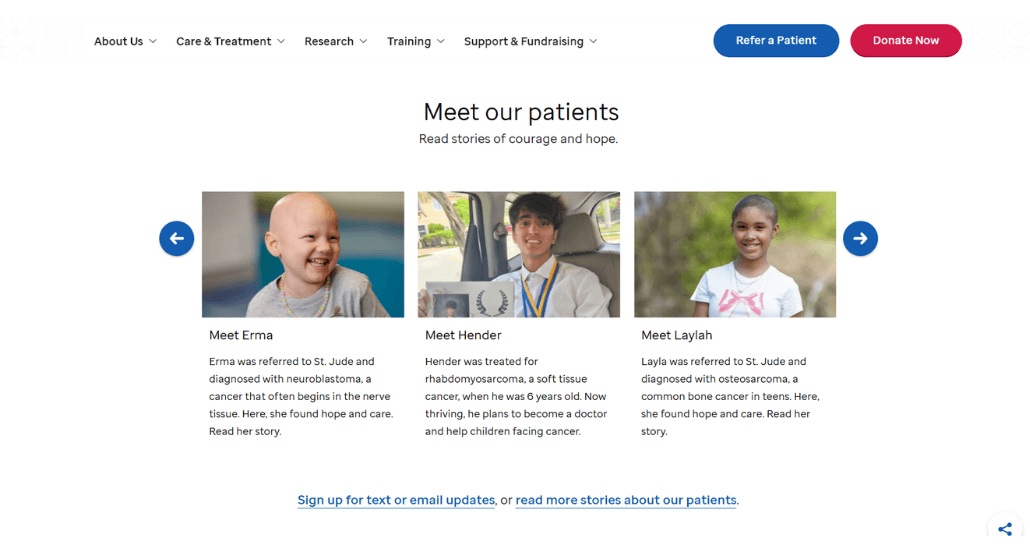
What also sets St. Jude apart is that, aside from having a dedicated Stories page, its impact storytelling is woven throughout the whole site. The Research page shows innovative solutions and outcomes thanks to their supporters; the Financials page compiles financial documents for transparency; and even the homepage cycles through photos of those they’ve helped.
The implicit message across every page is the same: our interventions work, these are the people it’s working for, and here’s the proof. That’s what separates effective impact storytelling from a few testimonials inserted into an otherwise transactional website.
Habitat for Humanity – Community and volunteer engagement
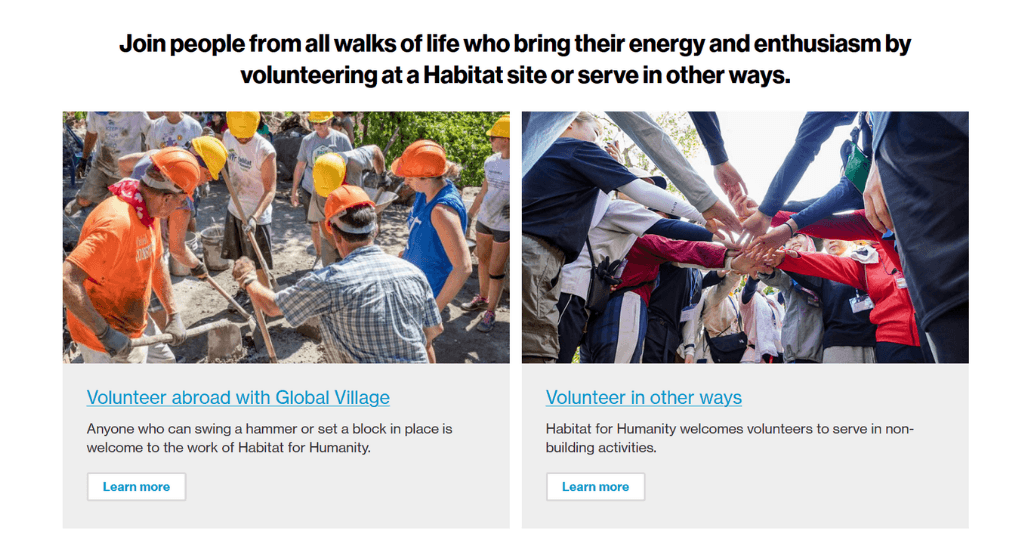
Habitat for Humanity‘s model runs on community participation. Volunteers build homes alongside the families who will live in them, but building isn’t the only way to get involved. The site makes it easy to find volunteer opportunities for non-construction roles too.
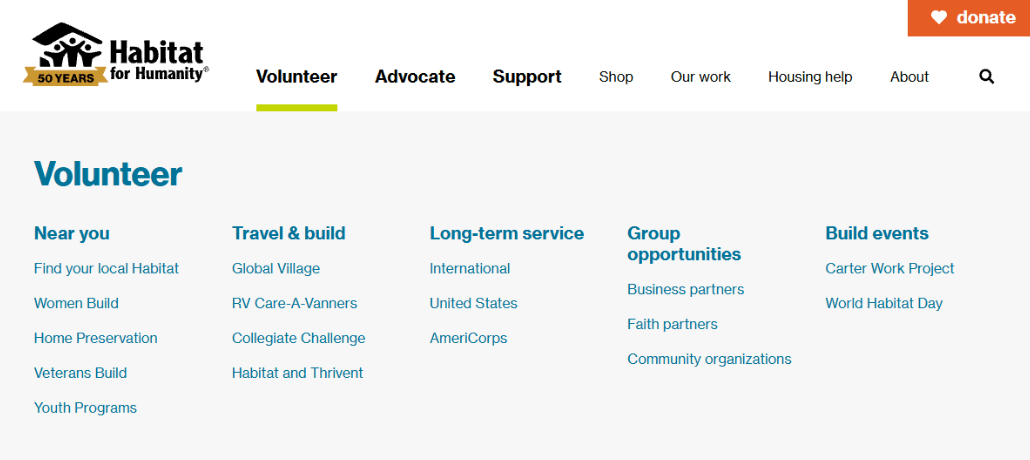
What’s worth borrowing is how Habitat frames engagement as accessible at every level of commitment: local or travel builds, short or long-term service, group opportunities, and scheduled build events. For nonprofits whose work genuinely depends on people showing up (not just giving), this approach makes it easier for supporters to find a meaningful way to contribute.
American Civil Liberties Union (ACLU) – Advocacy and awareness
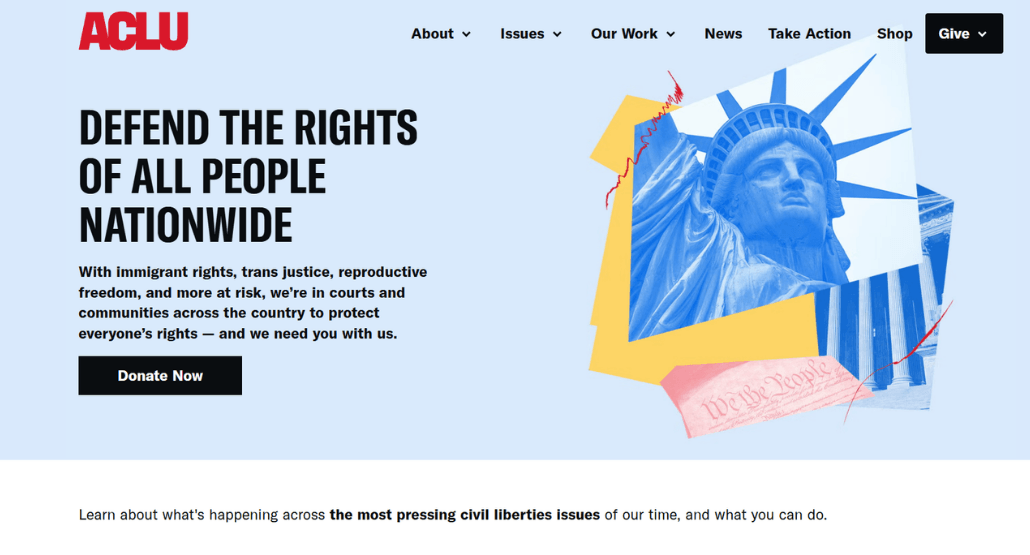
The American Civil Liberties Union (ACLU)’s website is structured around urgency. It highlights actual cases being litigated, legislation being tracked, and rights being threatened right now. When you land on the homepage, you’re seeing what they’re working on this week. That immediacy is what makes the site function less like a brochure and more like a newsroom, and it gives every call to action a reason to act today rather than someday.
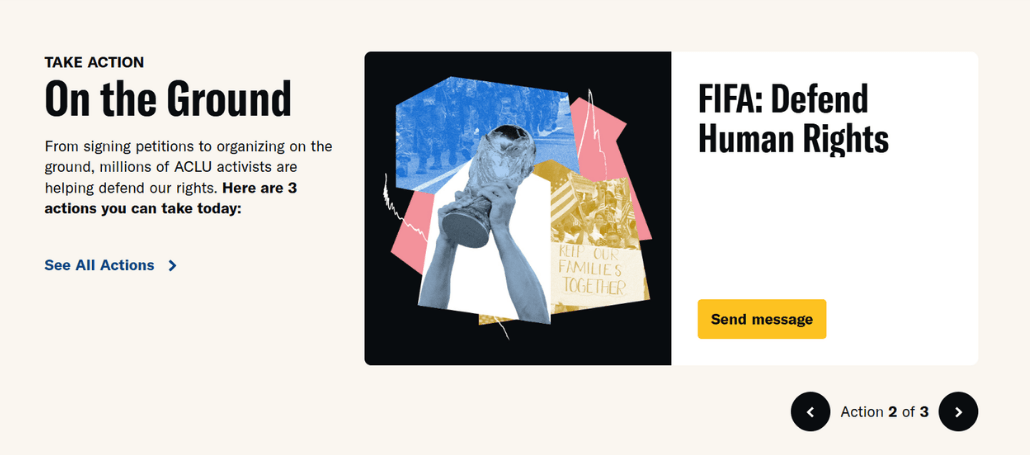
The advocacy infrastructure underneath that urgency is also worth noting. Action alerts are tied to real legislative timelines, so when the ACLU asks you to call your senator or sign a petition, there’s a specific bill, a specific vote, and a specific deadline attached to it.
Supporters are being directed toward a concrete action that the organization believes will have a concrete effect. For any nonprofit doing policy or advocacy work, that’s the model: make the ask specific, make the stakes clear, and make it obvious why right now is extremely important.
Feeding America – Multiple stakeholder journeys
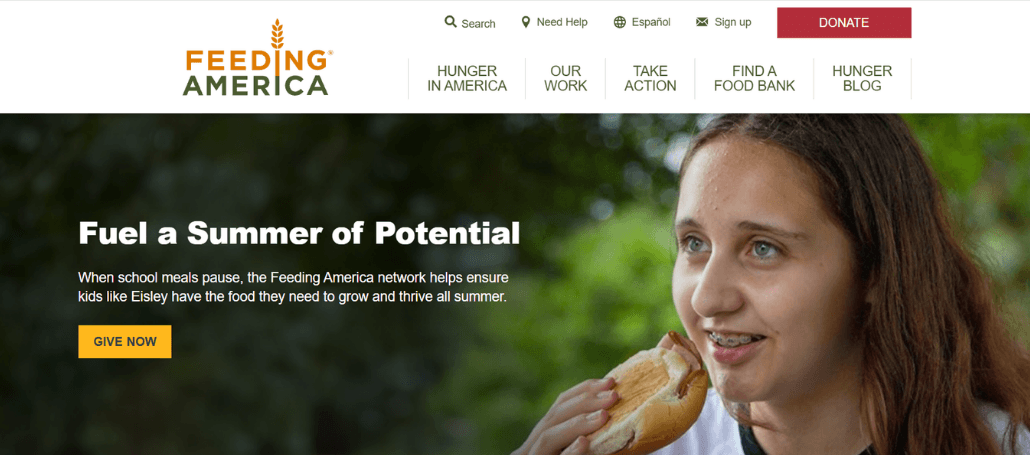
Feeding America’s network includes people facing food insecurity who need to find a local pantry, individual donors, volunteers, corporate food and fund partners, multiple member food banks, policymakers, and disaster relief collaborators, and the website has to serve all of them.
They pull this off by building distinct sections for each audience rather than trying to include everything into a single Get Involved page.
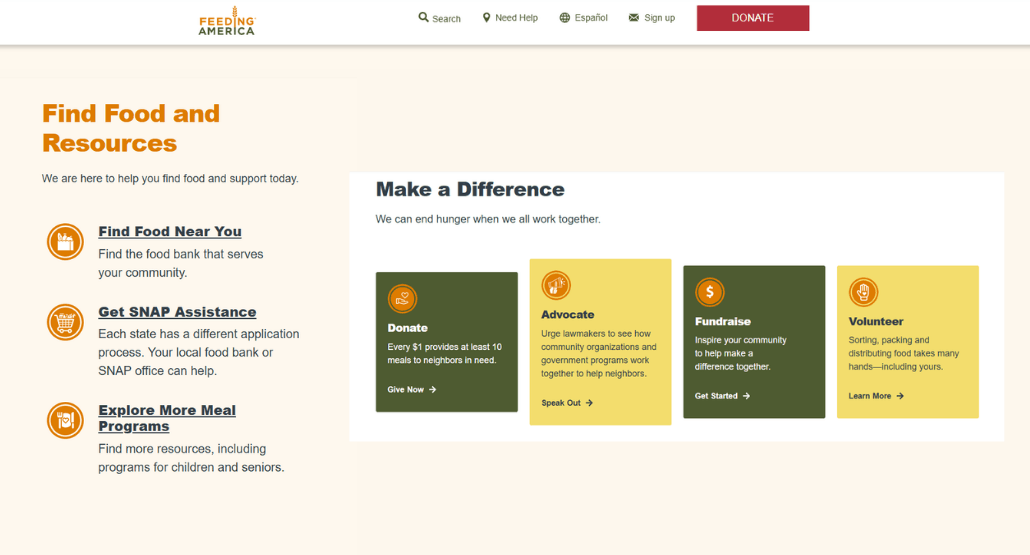
What makes this worth studying is that Feeding America doesn’t just segment by what people give – they segment by what people need from the site.
- Beneficiaries (find food and resources)
- Donors (donate)
- Supporters (advocate and raise money)
- Volunteers (volunteer)
Most nonprofits design their sites around the donor (which makes sense in many cases), but Feeding America, with its multiple stakeholders, treats each audience as a primary user and designs clear pathways for each audience to engage in the way that makes sense for them.
How to create a nonprofit website (a step-by-step guide)
Ready to build your nonprofit website? You do the hard work on the ground, and now it’s time to build a digital home that tells your story and makes it incredibly easy for supporters to join your cause.
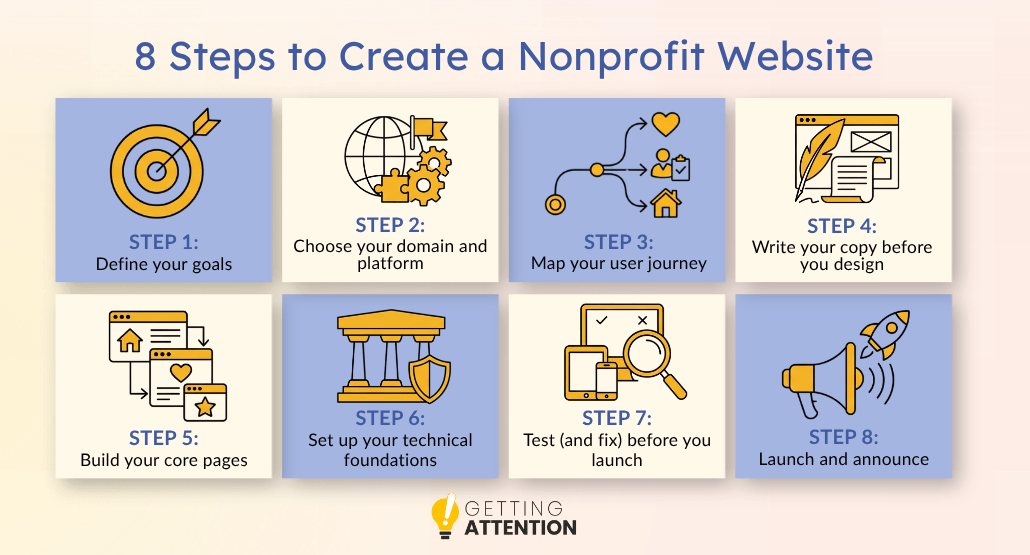
Step 1: Define your goals
Strong goals share three traits: they’re measurable, tied to a timeframe, and connected to something that’s important to the organization.
For example, a small nonprofit’s list might look like this:
- Increase online donations by 25% within 12 months of launch.
- Grow monthly recurring donors from 80 to 200 by year-end.
- Generate 40 new volunteer sign-ups per month.
- Cut bounce rate on the donate page from 65% to under 40%.
Step 2: Choose your domain and platform
Keep your domain name short and memorable. Ideally, it should match your nonprofit’s name as closely as possible and end in .org to signal your nonprofit status immediately, though don’t stress if you already have a .com address. That’s also perfectly fine. Pick the platform that fits your team’s ability to maintain it.
A few practical tips for the domain:
- Keep it under 15 characters when you can
- Buy the .com, .net, and any common misspellings while you’re at it. It’s cheap insurance against squatters and competitors. You’ll want to redirect all of these to your proper domain.
- Make sure your staff email domain matches (info@yourorg.org, not yourorg@gmail.com). A Gmail address on your donate page can erode donor trust by making your nonprofit seem less professional, and Google offers free professional emails as part of Google for Nonprofits.
Step 3: Map your user journey
Put yourself in the shoes of a first-time visitor. When they land on your homepage, what is the one thing they need to see to trust you? What is the next step they should take?
Sketched out, the four core journeys for most nonprofits look something like this:
- First-time donor: Google search → homepage → reads hero stat or impact pages→ clicks “Donate” → picks $50 → completes gift.
- Returning volunteer: Direct URL → clicks “Volunteer” in nav → scans upcoming events → signs up for Saturday shift.
- Beneficiary in need: Searches “free legal help [city]” → lands on Programs page → checks eligibility → clicks “Get Help” → submits intake form.
- Foundation program officer: LinkedIn link → reads About page → checks Form 990 and board member list → downloads annual report → adds you to the grant shortlist.
Step 4: Write your copy before you design
Picking a template and then trying to fill in the blanks with words is a common mistake that leads to generic, fluff-filled content. Writing your copy first forces you to figure out what you’re actually trying to say before you decide how it should look.
Follow these tips:
- Start with the homepage, then the donate page, then the about and program pages.
- Read every draft out loud. It should sound smart, professional, conversational, and genuine.
- Use “you” more than “we.”
If you’d prefer to have a professional copywriter draft your copy, website content writing services are always an option!
Step 5: Build your core pages
Build your pages in this priority order:
- Homepage
- Donation
- Pages tied directly to your top goals from Step 1.
This lets you launch with a smaller, sharper core if you run out of time or budget. It’s better to launch with ten great pages than thirty mediocre ones, and you can always add more later.
Some other tips that can help:
- Use a consistent layout template across similar pages (all program pages should look like each other, all blog posts like each other) so visitors learn your patterns quickly and your CMS stays manageable.
- Add internal links between pages as you build, not as an afterthought once the site is live.
- Preview every page on a phone as you go to make sure it’s mobile-friendly.
Step 6: Set up your technical foundations
We talked about the technical foundations of a nonprofit website a few sections back, but this is what that looks like in a priority list:
- Install an SSL certificate (the “HTTPS” in your URL) so donors know their data is safe.
- Set up Google Analytics and Search Console.
- Optimize your images so they don’t slow down your site.
- Submit your XML sitemap to Google Search Console so your pages get indexed.
- Set up conversion tracking on donations, form submissions, and any other action that matters.
- Set up 301 redirects from any old URLs to their new equivalents, so you don’t lose existing SEO rankings.
- Create a custom 404 page that helps lost visitors find what they were looking for.
Step 7: Test (and fix) before you launch
Build a launch checklist and don’t go live until every item is checked off.
The essentials:
- Check your site on an iPhone, an Android, a tablet, and a desktop. You can do this from your computer using Google’s Chrome DevTools.
- Test in multiple browsers.
- Make a real $5 donation through every payment method you offer. Confirm the receipt arrives. Confirm the donor record lands in your CRM.
- Submit every form. Confirm the notification email lands in the right inbox.
- Run the site through Google PageSpeed Insights and fix anything in the red zone.
- Run an accessibility scan with WAVE or Axe DevTools and fix major issues.
- Click every link in your navigation, footer, and key pages.
- Ask someone who knows nothing about your organization to try to make a $5 donation. If they get stuck, your donors will, too.
Step 8: Launch and announce
Once you hit “publish,” it’s finally time to tell the world. Some of the ways you can do that:
- Send an email to your list
- Post it on social media
- Update your email signatures
The mechanical side of launch deserves its own checklist:
- Point your DNS to the new site
- Confirm your 301 redirects are working
- Update your Google Business Profile and any directory listings (Candid, Charity Navigator, BBB, GreatNonprofits, etc.)
- Keep the old site accessible at a backup URL for a few weeks in case you need to reference something.
How to grow your nonprofit website after launch
Launching the site is just the beginning. Now you have to get people to visit it! The good news is that the systems for driving traffic, including search engine optimization (SEO), AI search visibility, and Google Ads, are the same ones for-profit companies pay agencies thousands of dollars a month to set up.
Nonprofits can use them too, often for a lower price.
Three channels matter most for nonprofits right now: traditional search (Google), AI search (ChatGPT, Claude, Perplexity, Gemini), and the Google Ad Grant. Get those three working, and you’ve built a traffic engine that runs quietly in the background while your team focuses on the actual mission.
How does SEO help nonprofits get found online?
Search engine optimization (SEO) is the process of making your site show up in the results when people search for terms related to your mission. For example, if you run a soup kitchen in Chicago, you want to be the first result when someone types “where to donate food in Chicago.”
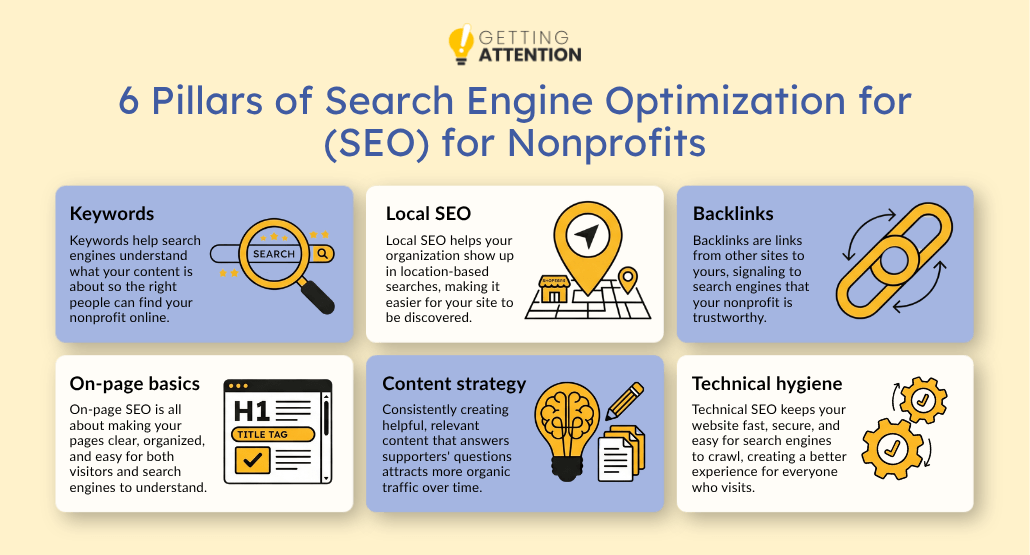
For this type of optimization, focus on:
- Keywords: Use the terms your audience actually types into Google. Tools like Ubersuggest, Ahrefs, Semrush, or even Google’s autocomplete will show you what people are actively searching for. As your site traffic grows, you can also find out how people are finding you using data from Keyword Planner in your Ad Grant or Google Search Console for organic. Weave those terms naturally into your headlines, body copy, image alt text, and URLs.
- Local SEO: For many nonprofits, local visibility is more important than national. Claim your Google Business Profile, fill it out completely (hours, photos, service area, description), and ask supporters to leave honest reviews.
- Backlinks: Links from reputable sites tell Google you’re trustworthy. Local news coverage, partner organizations, foundations that publicly list grantees, and guest posts on industry blogs all count. If you’re mentioned on someone else’s site but they don’t link to your website, ask them to! Also, ensure all pages you take down redirect somewhere so you don’t inadvertently lose a backlink by taking down a page.
- On-page basics: Every page needs a clear title tag (under 60 characters), a meta description (under 160 characters), and a single H1 headline, supported by H2s and H3s in descending order.
- Content strategy: Publish content that answers the questions your audience is already searching for. A food bank that publishes “How to apply for SNAP benefits in [your state]” will pick up steady, qualified traffic on an ongoing basis. You should plan for a mix of evergreen topics (updated on a 3 month cadence) with more timely topics that may follow seasonal interest or news cycles like elections.
- Technical hygiene: This includes fast load times, mobile-friendly design, no broken links, no duplicate content, and clean URLs. Google rewards sites that are well-maintained and demotes the ones that aren’t.
How can nonprofits optimize for AI and LLM search?
The way people find information is changing. Instead of just Googling it, they’re asking AI engines like ChatGPT or Claude.
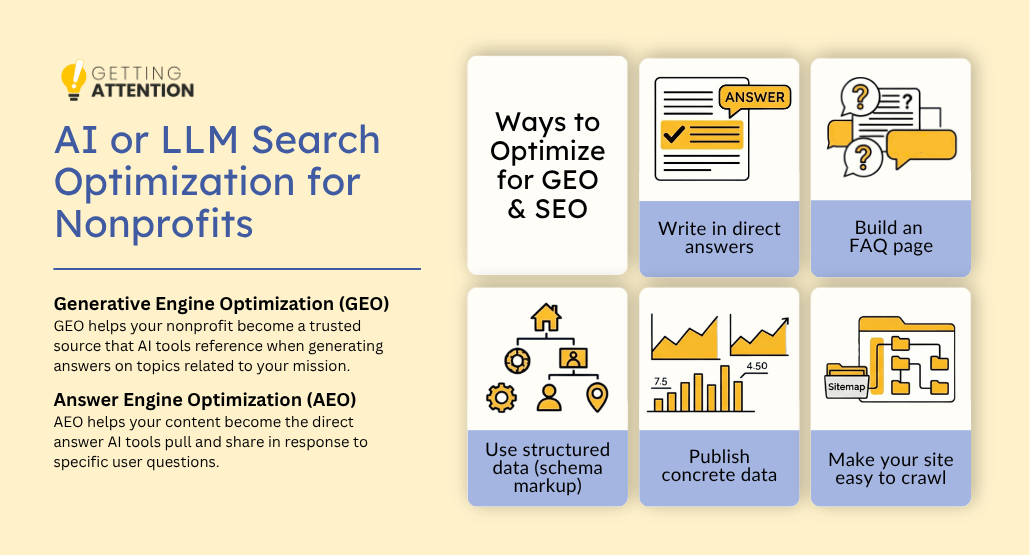
There are two distinct names for this type of AI visibility:
- Generative Engine Optimization (GEO): Being the source an AI draws from. When ChatGPT writes a paragraph about food insecurity in Chicago, you want your nonprofit to be one of the organizations it pulls from. That requires comprehensive, factual, well-cited content plus broader credibility signals across the web (mentions, backlinks, press coverage). GEO is reputation-driven.
- Answer Engine Optimization (AEO): Being the answer that an AI extracts. When someone asks, “How do I apply for emergency rent assistance in Cook County?”, you want your page to be what the AI lifts verbatim. That means clear question-and-answer formatting, direct language, and structured content that the AI can pull. AEO is content-driven.
The good news is that the tactics below help with both, because the same writing that makes you quotable also makes you citable. A few concrete tactics for getting chosen by AI:
- Write in direct answers
- Build an FAQ page
- Use structured data (schema markup)
- Publish concrete data
- Make your site easy to crawl
How does the Google Ad Grant help nonprofits reach more people?
Google gives qualifying 501(c)(3) organizations $10,000 every single month to spend on search ads. This allows you to show up at the top of search results when people look for the problems you solve. But Google has high standards for the websites it sends this traffic to. If your site is slow, confusing, or lacks clear calls to action, Google will stop showing your ads.
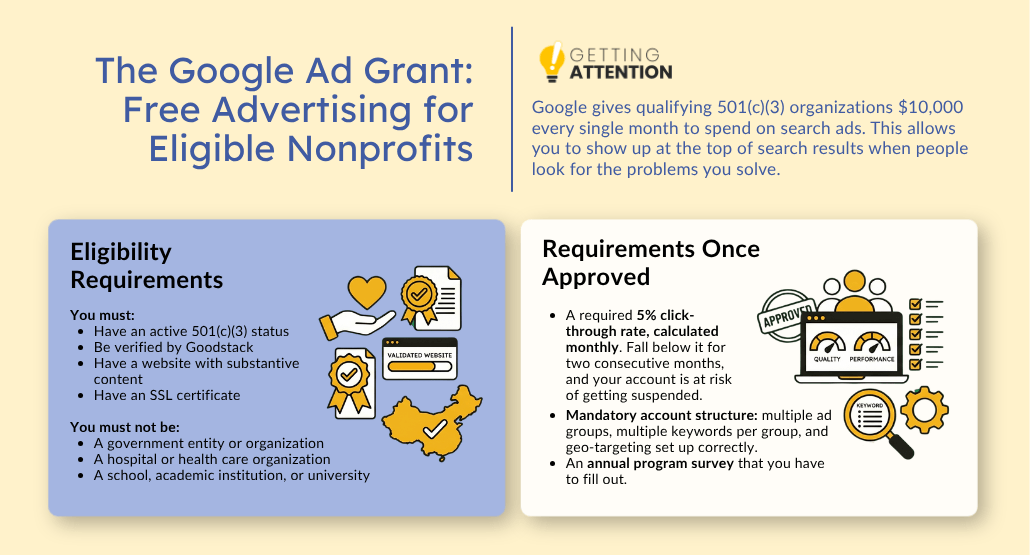
To qualify for the Grant, you need active 501(c)(3) status, Goodstack verification, a website with substantive content, and an SSL certificate so your URL starts with HTTPS. Hospitals, schools, and government entities are generally ineligible, but most other registered nonprofits can apply.
Once approved, you’ll work within a few important constraints:
- A required 5% click-through rate, calculated monthly. Fall below it for two consecutive months, and your account is at risk of getting suspended.
- Mandatory account structure: multiple ad groups, multiple keywords per group, and geo-targeting set up correctly.
- An annual program survey that you have to fill out.
At Getting Attention, we see the Ad Grant as the ultimate incentive to get your website right. Smart nonprofits prepare their websites for the Ad Grant to avoid errors that can cost them free advertising reach. And free advertising is one of the easiest ways for smaller and mid-sized nonprofits to get on the map!
How does Getting Attention help nonprofits get more from their website?
You can have the most aesthetically pleasing website, but if no one finds it, or if your words fall flat when visitors finally arrive, then it’s not working as hard as it could be for you. Our Google Ad Grant Management Service and Website Content Creation Service are designed to work hand-in-hand, maximizing your Ad Grant to boost your site with high-intent, qualified traffic.
Once those visitors arrive, our human-first storytelling takes the handoff. We write conversational, compelling copy that articulates your impact and guides your new audience toward your “Donate” or “Volunteer” button with zero friction. Together, they form a great team: our ad management brings them to your door, and our content inspires them to stay.
Frequently asked questions (FAQs)
What is the purpose of a nonprofit website?
A nonprofit website serves three main masters: credibility, conversion, and service delivery. It proves to the world that you are a legitimate organization and turns interested visitors into donors and volunteers.
What website domains do nonprofits use?
The standard is .org. It’s a universal symbol for “this is a mission-driven organization.” While you can use .com or .net, .org carries a level of trust that is hard to beat in the nonprofit world.
How to create a nonprofit website for free
You can use platforms like Wix or Weebly for $0, but you will usually be stuck with their branding (e.g., “yoursite.wixsite.com“) and very limited features. For a professional organization, it’s better to invest a small amount in a domain name and a basic hosting plan.
How do nonprofit websites make money?
Nonprofit websites generate revenue through direct donations, recurring monthly giving programs, event ticket sales, and merchandise stores. They also make money indirectly by saving staff time through automated volunteer signups and digital service delivery.
Can my Google Ad Grant get rejected because of my website?
Yes, Google will suspend your account if your website doesn’t meet its quality or compliance standards. This is because Google wants to make sure that the people clicking on their ads are getting a high-quality experience.